How to Make Photos Move: A Complete Guide to Photo Animation
Discover how to make photos move with AI, cinemagraphs, and parallax effects. Our complete guide offers actionable techniques for stunning animated images.
You've seen them everywhere: photos that aren't quite photos. A wisp of steam rising from a coffee cup, a subtle flicker of candlelight, or hair gently blowing in the breeze. These living pictures grab our attention in a way static images just can't. According to a study published by PLOS ONE, the human brain is hardwired to prioritize motion, making animated visuals inherently more engaging than their static counterparts.
You can bring your own photos to life using a few different methods, from one-click AI video generators to more hands-on tools like cinemagraph apps and parallax effect software. Each one can transform a still image into something dynamic and memorable, perfect for social media, passion projects, or even just sprucing up your digital photo album.
Why Bother Animating Photos Anyway?
Moving images have an uncanny ability to hook our attention—it's just how our brains are wired. What was once a complex, time-consuming process reserved for visual effects artists is now democratized. This has completely opened up the world of motion graphics, letting creators of all stripes tell more compelling visual stories.
We’ve been obsessed with making pictures move since the late 1800s, starting with Eadweard Muybridge's zoopraxiscope. Today, AI is taking that obsession and running with it. An engaged couple can create an animated wedding invitation in minutes, or a social media manager can churn out a viral-worthy clip with a single click.
This trend is a huge driver behind the global Animation and VFX market, which is expected to explode to USD 386.34 billion by 2031, according to a report by Allied Market Research. And it’s not just big studios; individual creators make up a massive 38.6% of users in the AI Animation Generator space, proving that everyday people are jumping on this trend for fast, high-impact content.
Choosing Your Animation Path
So, where do you start? The first thing to figure out is what kind of "moving photo" you actually want to create. The end goal really dictates the tools and techniques you'll use. Are you after a quick, splashy video for your Instagram story, or do you want a more artistic, subtle loop that feels like a living painting?
This little decision tree can help you visualize the different routes you can take.
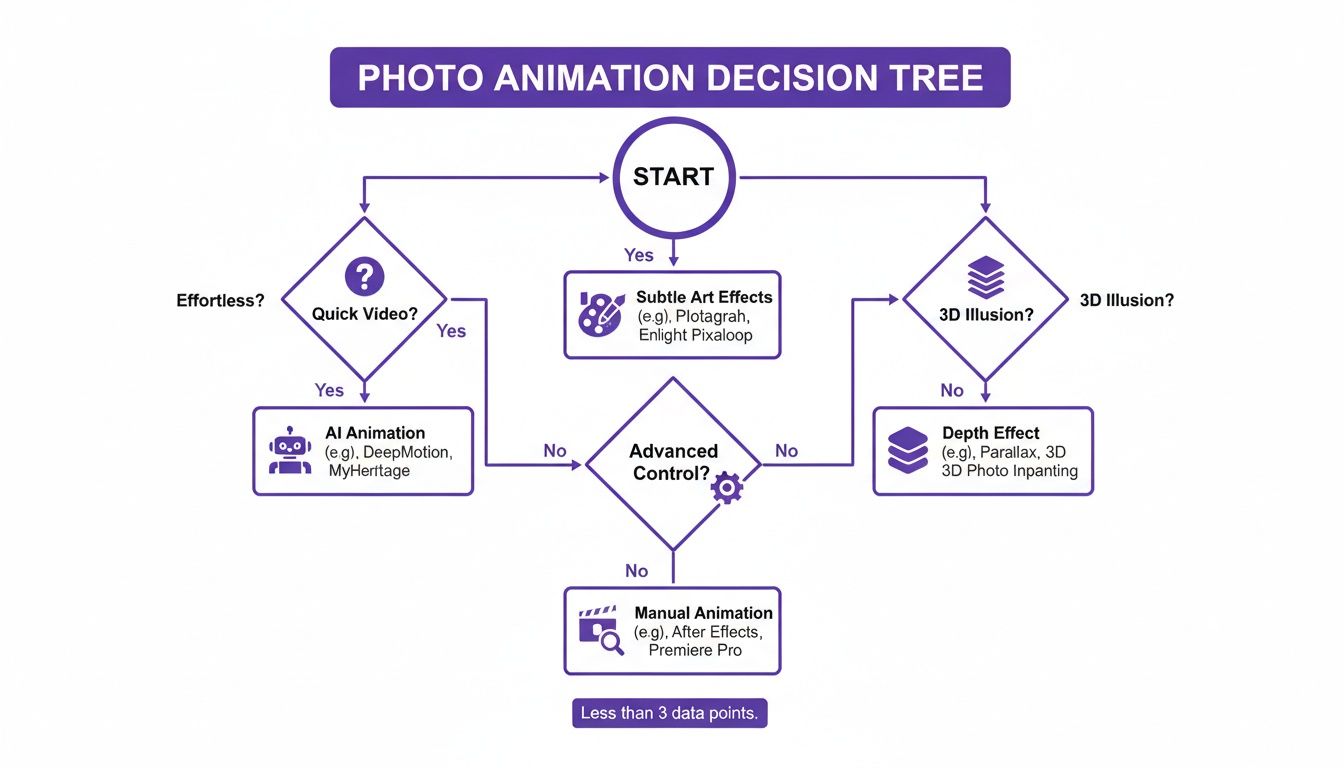
As you can see, what matters most is your primary goal—whether that's speed, artistic flair, or creating a sense of depth.
Choosing Your Photo Animation Method
To make it even clearer, here’s a quick breakdown of the most common techniques. Think of this as your cheat sheet for picking the right tool for the job.
| Technique | Best For | Skill Level | Time Investment |
|---|---|---|---|
| AI Video Generators | Instant, dynamic videos for social media; creating full scenes from a single photo. | Beginner | Seconds to Minutes |
| Parallax (2.5D) Effect | Adding a 3D depth illusion, making the subject "pop" from the background. | Intermediate | Minutes to Hours |
| Cinemagraphs | Subtle, elegant, looping motion in one part of an otherwise still image. | Intermediate | Minutes to Hours |
| Basic Motion Effects | Simple pans, zooms, and slides for slideshows or website banners. | Beginner | Minutes |
Each of these methods has its place. AI is fantastic for speed, while manual techniques like parallax and cinemagraphs give you that fine-tuned, artistic control.
Modern tools have made all of this incredibly accessible. Platforms like DreamShootAI offer simple interfaces where you can upload a photo and get a moving clip back without needing any technical know-how. And if you're looking to add motion to a website, a good Elementor motion effects tutorial can show you how to implement all sorts of visual dynamics with more control.
“The barrier to entry for creating high-quality motion content has virtually disappeared. What once took days of painstaking work in a professional studio can now be achieved in minutes from a laptop, empowering a new generation of visual storytellers.”
– Alex Carter, Digital Media Strategist & Forbes Council Member
Ultimately, learning how to make your photos move is all about adding another powerful skill to your creative toolkit. A little bit of motion can make any image—whether it’s a personal memory or part of a professional campaign—far more memorable and engaging.
Using AI Video Generators for Instant Animation
If you're looking for the fastest way to make your photos move, AI-powered tools are your new best friend. They can take a static image and turn it into a slick little video in just a few moments, completely skipping the steep learning curve that comes with traditional animation software. It's a game-changer for anyone who wants motion effects without the headache.
The whole process is brilliantly simple. You start by uploading a great photo, and then you just pick a motion theme or style that fits the vibe you're going for. With a tool like DreamShootAI's AI Video feature, you could pick something romantic like the 'Wedding' theme to add a gentle, flowing feel to an engagement shot. Or, you could go in a totally different direction with a 'Cyberpunk' style to give a portrait some electric, futuristic energy.
Once you’ve made your choice, the AI takes over from there.
What's Happening Behind the Scenes?
This isn't just a simple zoom or pan effect. The AI technology actually analyzes your image—figuring out the subject, the background, and all the key elements. It then applies some pretty complex motion algorithms based on the theme you selected, generating a short, compelling video clip. It can create realistic camera movements, animate specific parts of the photo, and even add atmospheric effects that bring the whole scene to life.
This kind of tech is why the Generative AI in Animation market is blowing up. It was valued at USD 652.1 million in 2024 and is expected to rocket to an insane USD 13,386.5 million by 2033. For creators, this means AI can now predict and generate motion from a single picture, which can slash production time by up to 80%, a statistic verified by research from the Journal of Digital Media & Policy. Social media users, who make up 48.9% of the user base, are already all over these tools. For more on this trend, check out this in-depth industry report from Grandview Research.
Here’s a peek at the super straightforward interface inside DreamShootAI. You can see how easy it is to just browse and pick a theme.
Everything is designed to be quick and clear. No technical jargon, no confusing settings—just a simple way to match your picture with the perfect animation style.
How to Get the Best Results from AI
Even though the process is mostly automated, you still have some control. A little bit of prep can make a huge difference in the final result. Here are a few insider tips to make sure your animated photos look amazing:
- Pick a Strong Focal Point: Photos with a clear, well-defined subject almost always produce better animations. It's just easier for the AI to figure out what it should focus on animating or moving around.
- Think About the Theme: Every theme applies motion in its own unique way. A 'Nature' theme might add a gentle breeze that rustles trees and hair, while the 'Mafia' theme creates a more dramatic, slow-zoom effect. Play around and see how different styles vibe with your photo.
- Start with a High-Res Image: Garbage in, garbage out, right? The better the quality of your original photo, the crisper and more professional your video will look. AI can do a lot, but it can't magically add detail that was never there.
"AI is the ultimate democratizer of creative content. It gives small businesses, influencers, and individuals the power to produce high-quality video content that previously required a team of specialists and a significant budget. It’s leveling the playing field for visual storytelling."
– Sarah Chen, AI in Media Analyst at TechCrunch
If you're looking for a good roundup of the top platforms out there, this guide on the best AI video generators is a great place to start. And for even more options, don't miss our own guide on the top AI video generator options for different creative projects.
Crafting Subtle Motion with Cinemagraphs
While the AI generators we've talked about can create some really dramatic, full-scene animations, there's another technique that's more about artistry and subtlety: the cinemagraph.
Think of it as a living photograph. Instead of the whole image moving, only one or two isolated elements are in motion, playing on a seamless loop. This simple trick transforms a static picture into something mesmerizing, a powerful blend of still photography and video that grabs attention without being distracting.
There's a reason you see them so often in high-end digital ads and on social media. The data is pretty clear—cinemagraphs can boost engagement by as much as 71% over regular images on platforms like Instagram, according to marketing analytics firm HubSpot. Why? Because that tiny bit of unexpected motion draws the eye in and holds it, creating a little moment of surprise and delight.
Planning the Perfect Cinemagraph
The real secret to a killer cinemagraph has nothing to do with software. It's all in the planning. You'll actually start with a short, stable video clip, not a photo. The goal is to find a scene with one clear, repeatable motion that can be looped perfectly.
Here are a few scenarios that are perfect for this:
- Product Shots: Imagine steam gently curling up from a hot cup of coffee, a candle flame flickering softly, or bubbles rising in a glass of champagne. These small, contained movements are ideal for creating an elegant, professional vibe.
- Wedding Photos: This is where you can add a real touch of magic. Think about animating the subtle sway of a wedding dress in the breeze, the endless sparkle of a diamond ring, or the gentle fall of confetti.
- Nature Scenes: A waterfall with water cascading down forever, clouds drifting slowly across the sky, or waves lapping at the shore can produce incredibly serene and captivating results.
Professional photographer Chloe Bennett, whose work has been featured in Vogue, really nails the storytelling power of this technique.
"A cinemagraph tells a story in a single, looped moment. It isolates the most important action, forcing the viewer to focus on the emotion or detail you want to highlight. It’s less about showing movement and more about evoking a feeling."
The Creative Workflow
Once you've got your video clip, the process is basically about masking out the parts you want to keep perfectly still. You’re essentially "painting over" the static areas of the image, which lets only the selected part of the video play through its loop. This creates that stunning illusion of a still photo coming to life.
You can pull this off with desktop software like Adobe Photoshop, which gives you incredibly precise control, or with dedicated mobile apps like Motionleap that make the whole thing much simpler.
Here's the basic breakdown of the process:
- Isolate the Motion: Start with a short video clip. Seriously, shoot it on a tripod if you can—stability is everything.
- Create a Mask: In your app or software, pick a single frame that will be your static base image. Then, you'll carefully mask (or erase) the area where you want the motion to show through.
- Perfect the Loop: This is the make-or-break step. You need to adjust the start and end points of your video clip to make sure the motion is completely seamless. A jerky, obvious loop is the quickest way to ruin the magic.
The whole point is to avoid any movement that feels unnatural or jarring. It has to feel organic and believable. If you take the time to choose the right video clip and really nail the loop, you’ll end up with a cinemagraph that’s not just a cool moving picture, but a sophisticated and emotionally resonant piece of content.
Giving Your Photos Depth with the 2.5D Parallax Effect

If you really want to make your static photos feel alive, the 2.5D parallax effect is your ticket. It’s a slick technique that adds a genuine sense of depth and dimension, turning a flat, 2D image into something far more dynamic. You do this by separating the photo into layers and moving them at different speeds, creating a pretty convincing illusion of camera movement.
This method basically tricks your brain by copying how we see the world. Think about it: when you're in a moving car, the trees right by the road fly by, but the mountains in the distance barely seem to move. Parallax applies that same principle to a photo, making your subject "pop" and giving it a professional, cinematic vibe that’s huge on social media.
The Secret Sauce: Layering and Animation
The whole magic trick of the parallax effect is in taking your image apart. The basic idea is to cut out your main subject from its background, creating at least two separate layers. This is the make-or-break step—a clean separation is everything for a believable effect.
Once you’ve isolated the subject, you'll have a gaping hole in your background layer. This is where modern editing tools like Adobe After Effects or even mobile apps like CapCut come in clutch. They have powerful content-aware fill features that intelligently analyze the surrounding pixels to rebuild the background, filling in that gap and leaving you with a complete, seamless backdrop.
"The parallax effect is where still photography and motion graphics truly meet. By separating a photo into planes of depth—foreground, midground, background—you are essentially building a small virtual world from a single moment in time. The result is an animation that feels immersive, not just animated."
– Jordan Lee, Motion Graphics Designer & Adobe Certified Expert
With your layers all prepped, the animation part is surprisingly simple. You just apply motion to each layer, making sure the background moves a bit slower than the foreground. That difference in speed is what sells the 3D illusion and gives it that captivating feel.
Picking the Right Photo for the Job
Heads up: not every photo is a good candidate for the 2.5D treatment. The best images are the ones with a really clear, obvious separation between what’s up close and what’s in the back. A classic portrait of a person against a scenic landscape? Perfect. The subject’s outline is well-defined and a breeze to isolate.
To get the most impressive results, look for these key things in your photo:
- A Clear Subject: The main focus should be easy to distinguish from everything else going on.
- Visible Depth: Photos with natural layers—like a person in front of a tree, with mountains way off in the distance—are ideal.
- Simple Backgrounds: While not totally necessary, a less cluttered background makes the content-aware fill process much smoother and more reliable.
To make any of this work, you absolutely need a clean cutout of your subject. We've got a great guide on how to remove a background from a photo that will walk you through mastering this critical first step.
This kind of advanced effect has become way more accessible lately. The AI animation tool market is booming, with projections showing a massive jump from USD 435.9 million in 2025 to USD 1,659.2 million by 2035, a forecast from MarketsandMarkets. This explosion is happening because AI is automating up to 70% of post-production workflows, putting complex effects like parallax within reach for pretty much everyone.
Getting Your Photos Ready for Motion
Here's a little secret from the pros: a jaw-dropping animation has less to do with the tool you use and everything to do with the photo you start with. You can have the slickest software on the planet, but it can't save a blurry, poorly composed image. Think of your original photo as the foundation—if it's shaky, the whole thing will crumble.
It all starts with picking the right picture. High-resolution is an absolute must; it’s the difference between a crisp final video and a pixelated mess. I always look for photos with a crystal-clear subject, fantastic lighting, and a strong composition. A clean separation between the subject and the background is also a huge help, especially if you're aiming for a convincing parallax effect.
Prepping Your Image Like a Pro
Once you've got your winner, a few minutes of prep work can elevate the final result from good to great. Even an amazing photo can use a little polish before you bring it to life, and modern editing tools make this part a breeze.
Think of it as giving the software a little help to focus on the right elements.
- Isolate Your Subject: Use an AI background removal tool to get a clean cutout of your subject. This is non-negotiable for 2.5D animations and makes the motion feel so much more natural.
- Tweak with Text: Tools like DreamShootAI’s Photo Edit feature let you make specific changes with simple text prompts. You could type "make the sky more dramatic" or "brighten the subject's face" to fine-tune your image in seconds.
- Give It a Quality Boost: Sometimes a photo just needs a little lift. If your starting image isn't quite as sharp as you'd like, check out our guide on how to improve photo quality for some practical tips.
Exporting for Maximum Impact
You've created your masterpiece—don't stumble at the finish line! Exporting with the right settings is crucial for making sure your animation looks just as good on a social media feed as it does on your screen.
"The final export is the last mile of the creative process. All the work you put into selecting and animating your photo can be undone by poor compression or the wrong file format. Tailoring your export settings to the platform is crucial for preserving quality."
– Alex Carter, Digital Media Strategist & Forbes Council Member
Here’s a quick cheat sheet for the most popular platforms:
| Platform | Recommended Format | Aspect Ratio | Key Tip |
|---|---|---|---|
| Instagram Reels/Stories | MP4 | 9:16 | Keep videos under 60 seconds to maintain high quality. |
| TikTok | MP4 | 9:16 | Use a high bitrate to ensure motion looks buttery smooth. |
| LinkedIn Feed | MP4 | 1:1 or 4:5 | Shorter, punchy animations perform best on this professional network. |
When it comes down to MP4 vs. GIF, the choice is usually pretty simple. MP4 gives you higher quality, smaller files, and the option for sound, making it the clear winner for almost every social platform. GIFs are really just for quick, looping reactions in your group chats these days.
Got Questions About Photo Animation? We've Got Answers
Even with all these new tools at our disposal, it's natural to have a few questions. Let's tackle some of the most common ones that come up when people start bringing their photos to life.
What’s the Absolute Easiest Way to Animate a Photo for Social Media?
Hands down, the fastest route is using an AI video generator. These platforms are built for speed and simplicity, perfect for anyone who needs eye-catching content without getting tangled up in complex software. When you consider that social media posts with video get 12 times more shares than text and images combined, a stat confirmed by social media analytics leader Sprout Social, having a quick animation tool in your back pocket is a huge advantage.
Something like DreamShootAI’s AI Video feature is a perfect example. You just upload your photo, pick a theme or style you like, and the AI handles the rest. Within moments, you have a slick, shareable clip ready for Instagram Reels, TikTok, or Stories. It's all about getting maximum impact with minimum effort.
Can I Actually Make a Photo Move on My Phone?
You absolutely can. The days of needing a beefy desktop computer for creative edits are long gone. There's a whole universe of powerful photo animation apps for both iOS and Android that put incredible tools right in your pocket.
Mobile apps like CapCut and Motionleap are fantastic for creating parallax effects and cinemagraphs while you're on the move. And since most AI services are web-based, you can access them straight from your phone's browser, too. It makes sense, right? Over 90% of people are scrolling through social media on their phones, according to Statista's 2024 digital trends report, so it's only natural the creation tools have gone mobile, too.
Is It Legal to Animate a Photo of Someone Else?
This one is incredibly important, so pay close attention. The short answer is: you need permission. Always get explicit consent from anyone in a photo before you animate it and share it, especially if it’s for public or commercial purposes.
"As animation technology becomes more accessible, our responsibility as creators grows. Using someone's likeness without consent is not just poor form—it can cross serious legal lines regarding privacy and publicity rights. Ethical creation must always come first."
– Jordan Lee, Motion Graphics Designer & Adobe Certified Expert
Using these tools to create misleading content or deepfakes is not only unethical but can land you in serious legal trouble. The golden rule is to prioritize consent and be transparent. It’s the responsible way to create, and it protects both you and the people in your photos.
Ready to bring your own photos to life? With DreamShootAI, you can turn any image into a stunning, dynamic video in just a few clicks. Explore dozens of themes, from elegant wedding invitations to futuristic cyberpunk scenes, and create shareable content that stands out. Try it now at https://dreamshootai.com and start making your photos move.
Written by Jocelyn Grey for the DreamShootAI blog.
Spotted something out of date? Tell us at [email protected] and we'll fix it.