Portrait from photo: Create Stunning AI Portraits in Minutes
Learn to craft a professional portrait from photo with AI. This guide covers prep, prompts, and edits for striking results.
Turning your favorite selfie into a stunning, studio-quality portrait is easier than you might think. Just upload a few shots you love, and an AI tool like DreamShootAI can generate incredible results in minutes. This process is all about merging your best features with artistic styles, giving you a fast and affordable way to get professional photos without a traditional photoshoot.
The New Age of Digital Portraits
Remember when getting a professional portrait meant booking an expensive photographer, finding a studio, and spending hours posing? Those days are quickly fading. Now, anyone can turn a simple selfie into a piece of art, unlocking creative possibilities that used to be out of reach for most of us. This isn't just a fun trend; it's a real shift in how we create and think about our own images.
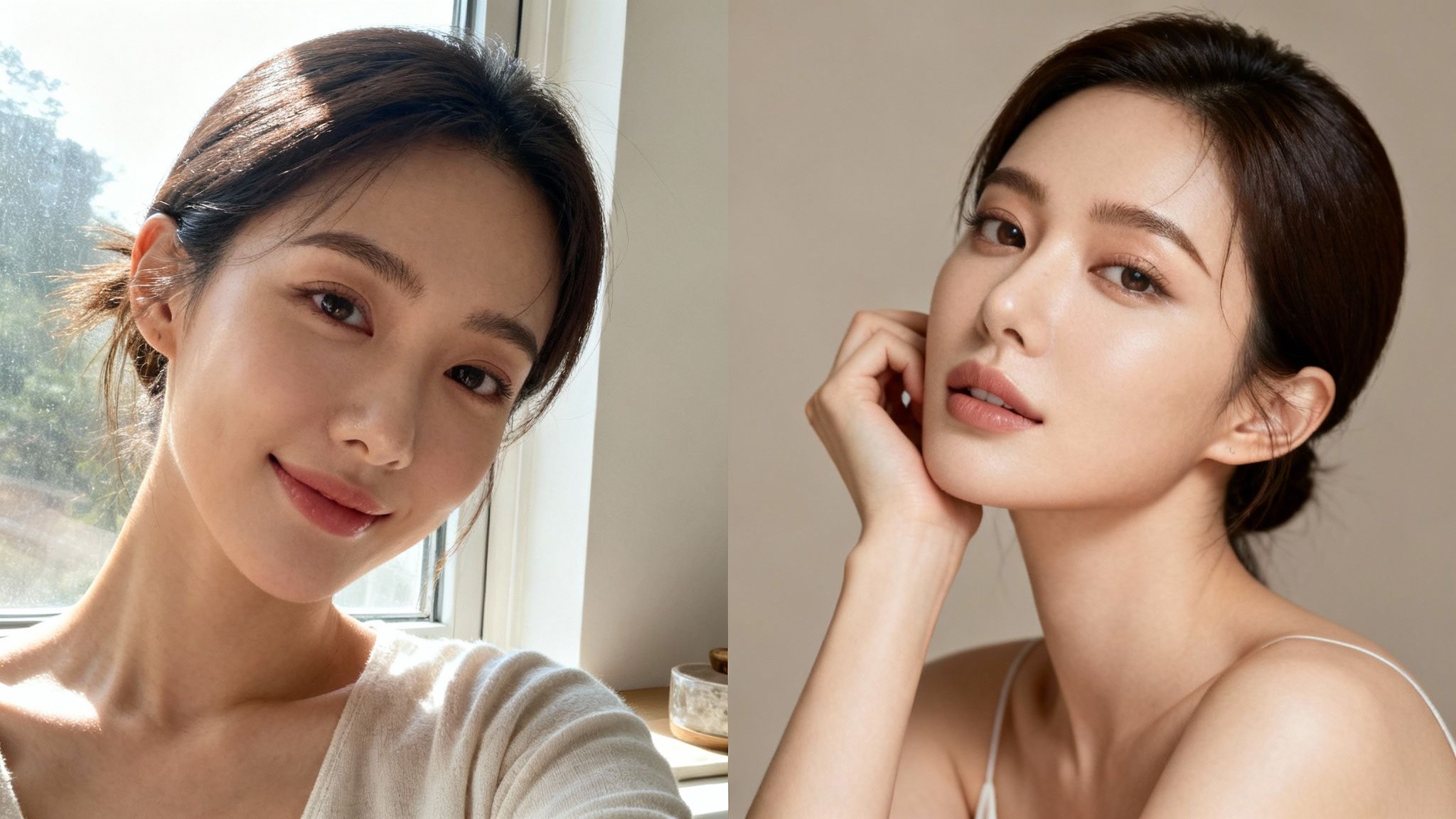
This whole movement is driven by two things: accessibility and creative freedom. You're no longer held back by your location, budget, or a photographer's schedule. Instead, you're in the director's chair, creating everything from a polished corporate headshot to a romantic couple's portrait, all from the palm of your hand.
Why AI-Generated Portraits Are Exploding
So, why is everyone suddenly turning their photos into AI portraits? A few key things are fueling this explosion. First, the scale is just massive. The market for AI-generated images blew up in early 2023, and by the end of that year, a mind-boggling 34 million AI-generated images were being created every single day. That volume alone tells you a major change is underway in how we all produce visual content. (You can read more about this AI image trend from Brookings).
Second, the quality is seriously impressive now. Platforms like DreamShootAI use sophisticated algorithms that don't just copy your face—they analyze your features to generate images that are both accurate and artistically beautiful. This tech gives you an incredible amount of control, letting you dial in the style, lighting, and mood down to the smallest detail.
"AI is democratizing creativity at a scale we've never seen before," states Reid Hoffman, co-founder of LinkedIn. His observation underscores a fundamental shift: the power to create high-quality, professional-looking images is no longer just for people with expensive gear and years of training. It's for everyone.
What This Means for You
For you, this technology opens up a playground for creative expression. You can see yourself in scenarios you’ve only dreamed of—attending a glamorous gala or starring in a rustic wedding scene—all without leaving your couch. It’s a game-changer for so many people:
- Professionals who need a sharp, updated headshot for their LinkedIn profile.
- Couples looking for unique photos to celebrate an engagement or anniversary.
- Content creators who need a steady stream of high-quality visuals for their social media feeds.
- Anyone who just wants to experiment with their personal style and create beautiful images for fun.
Ultimately, turning a photo into a portrait is about more than just slick technology. It's about taking back control over your personal brand and bringing your creative vision to life. This guide will walk you through exactly how to do it, step by step.
Getting Your Photos Ready for AI
Let's start with a hard truth: the quality of your final AI portrait is a direct result of the photos you feed the machine. It’s the classic ‘garbage in, garbage out’ scenario. Honestly, getting this first step right is the single most important thing you can do to get a professional portrait you'll love.
This is all about giving the AI a crystal-clear understanding of your facial features. Modern AI portrait tools work by analyzing a collection of your photos to build a unique biometric template—essentially, a mathematical version of your face. To get this right, you'll typically need to upload between 7 and 40 photos. You can get a deeper dive into the tech behind AI-generated headshots over at BriefcaseCoach.com.
Focus on High-Quality Inputs
For the AI to learn your face accurately, the photos have to be clear and well-lit. This means skipping the shots from that dimly lit concert, heavily filtered Instagram posts, or any picture where your face is half-hidden by sunglasses or weird shadows. The goal here is to provide a clean, unambiguous dataset for the AI to learn from.
Good, soft lighting is your best friend. Think about facing a window for some nice, natural light instead of standing under a harsh ceiling light that casts unflattering shadows down your face. A solid collection of clear selfies and photos, taken on different days and in various lighting conditions, gives the AI the best possible chance to create something amazing.
This example from DreamShootAI is a perfect illustration of what to aim for.
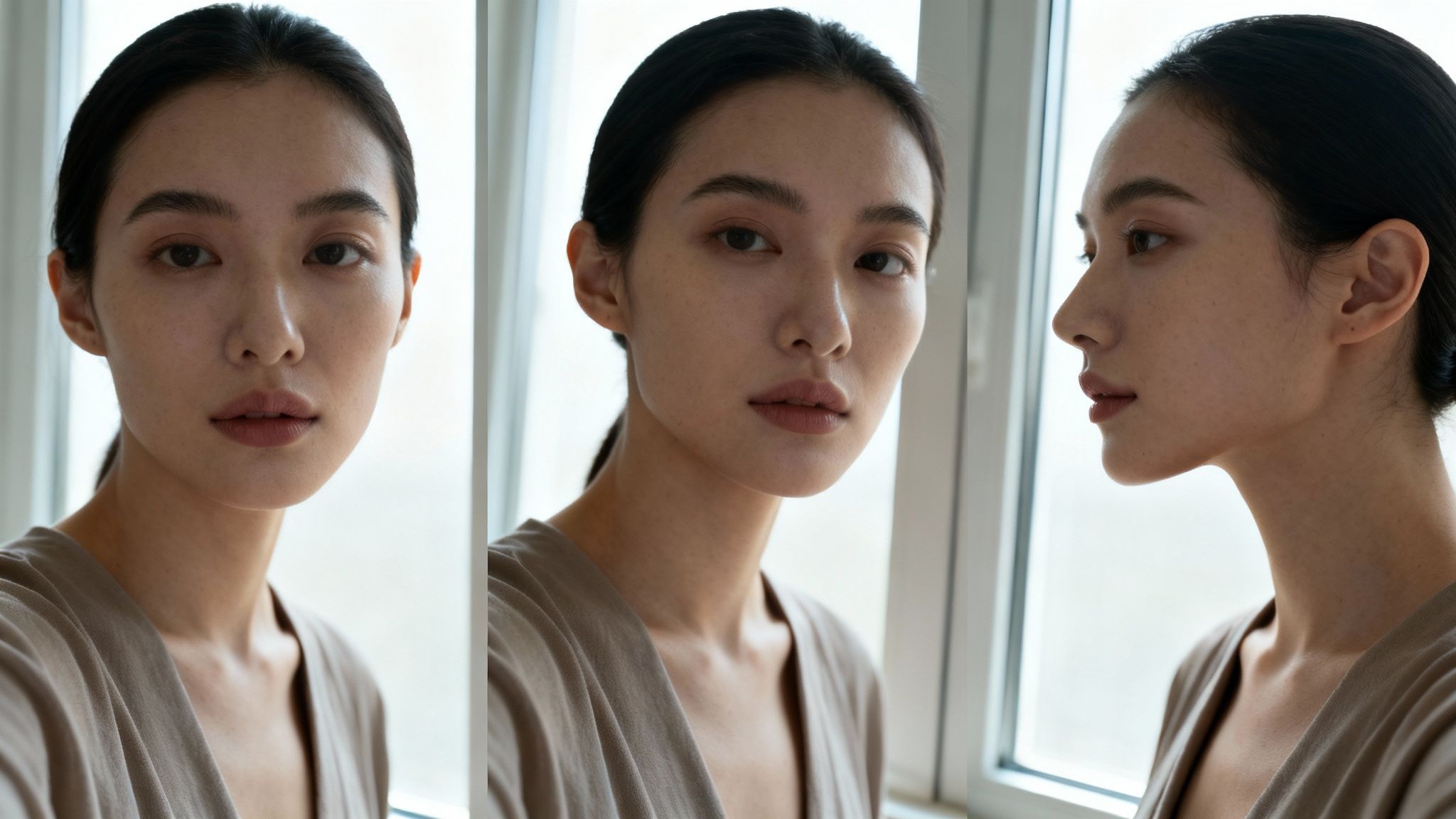
See how the light is even and her features are sharp? That’s the kind of high-quality data that leads to incredible AI portraits.
To make it even simpler, here's a quick checklist comparing what works and what doesn't.
Source Photo Quality Checklist
| Attribute | Ideal Quality (Do This) | Poor Quality (Avoid This) |
|---|---|---|
| Lighting | Bright, even, and natural (e.g., facing a window). | Dim, harsh overhead lights, or strong side-lighting. |
| Clarity | Sharp, in-focus, and high-resolution. | Blurry, pixelated, or low-resolution images. |
| Obstructions | Face is fully visible and clear. | Sunglasses, hats, hands, or heavy shadows covering the face. |
| Filters | Natural, unfiltered photos. | Heavy social media filters, artistic effects, or black & white. |
| Head Angle | A mix of front-facing, 3/4 view, and profile shots. | All photos taken from the exact same angle. |
| Expression | Variety of expressions: smiling, neutral, serious. | Only one expression across all photos (e.g., all smiling). |
| Background | Simple, uncluttered backgrounds. | Busy, distracting backgrounds that compete with your face. |
Stick to the "Do This" column, and you'll be giving the AI exactly what it needs to succeed.
Create Variety for Better Results
Quality is king, but variety is the queen. Don't just upload ten photos you snapped in the same spot, five seconds apart. You need to show the AI your face from different perspectives. This is crucial for making sure the final portrait looks like you from any angle, not just straight-on.
According to AI research from MIT, diverse training data is the foundation of an effective model. The more varied and high-quality your inputs, the more accurate and stunning the output will be. This prevents the AI from creating a "flat" or one-dimensional version of you.
To build a really robust collection of images for the AI, run through this quick checklist:
- Diverse Angles: Make sure you have photos looking straight at the camera, some three-quarter views, and a few profiles.
- Varied Expressions: Mix it up with smiles, neutral expressions, and maybe even a couple of serious looks.
- Different Backgrounds: Stick to simple, uncluttered backgrounds so the focus stays on your face.
- Range of Outfits: Photos in different shirts or with different necklines can help the AI generate more versatile results.
Taking a few extra minutes to curate a strong set of source images is the best investment you can make in the process. For a little more help, be sure to check out our complete guide on how to improve photo quality for AI.
Writing Prompts That Generate Amazing Portraits
This is where your vision really comes to life. A well-crafted prompt is the difference between a generic AI image and a stunning portrait from photo. It's less about telling the AI what to create and more about guiding it on how to create it—down to the last detail.
Think of yourself as a photoshoot director. A great photographer doesn't just say, "Okay, pose." They'd be tweaking the lights, framing the shot, and coaching the subject's expression. Your prompt does the exact same thing for the AI. It's your creative instruction manual.
The Anatomy of a Powerful Prompt
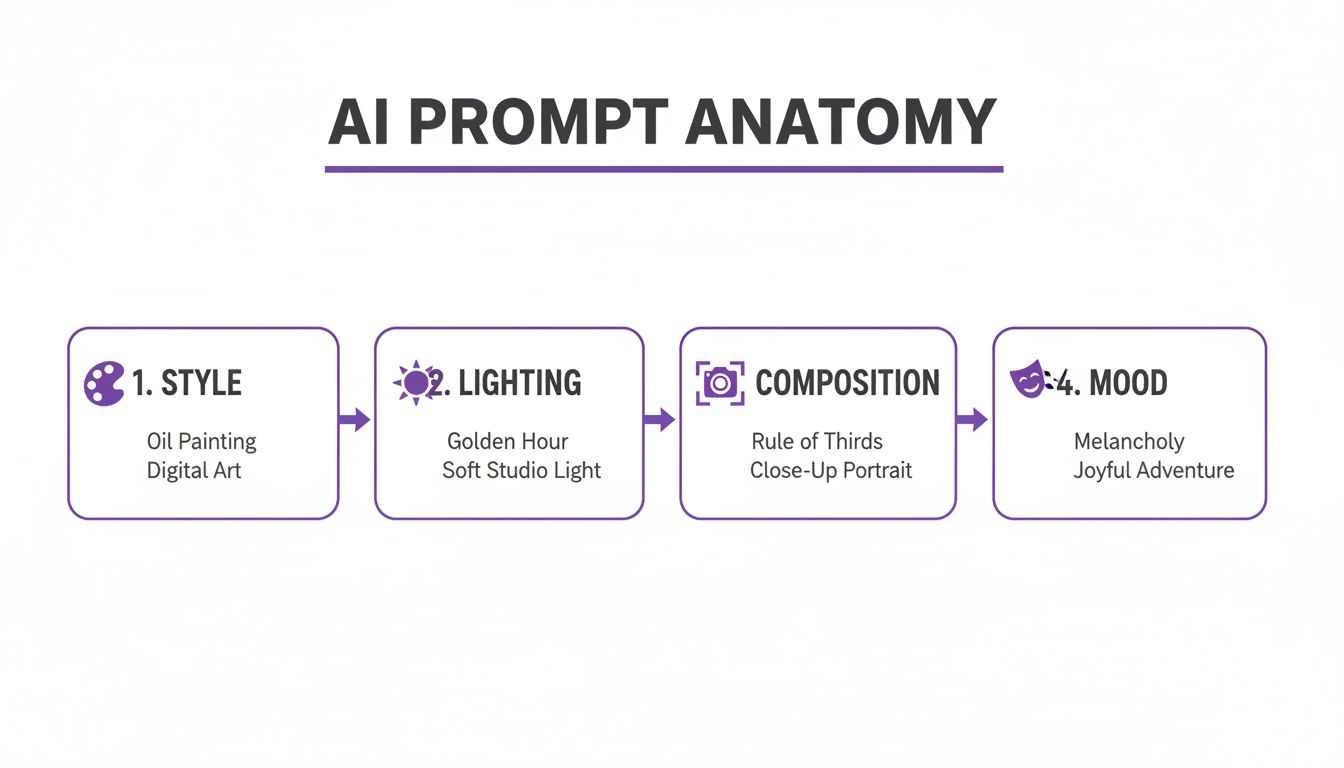
A strong prompt is built from layers of descriptive detail. Instead of just asking for a 'professional headshot,' a killer prompt gives specific artistic direction. The goal is to paint a vivid picture for the AI, leaving as little as possible to chance.
Let's break down the essential ingredients that turn a basic idea into a masterpiece.
- Subject and Setting: Be crystal clear about who is in the portrait and where they are. For example:
A man in a tailored business suit standing in a modern, sunlit office. - Artistic Style: Define the overall aesthetic. Are you going for photorealistic, something more painterly, or a specific vibe? Try this:
Ultra-realistic photograph, style of Annie Leibovitz. - Lighting: This is everything when it comes to mood. Get specific about the light source, its quality, and direction. Something like:
Soft natural light from a large window on the side, casting gentle shadows. - Composition and Camera Details: Describe the framing and even the camera settings you're imagining. For example:
Medium close-up shot, head and shoulders, shallow depth of field, blurred background. - Mood and Expression: What emotion do you want the portrait to convey? Nail it down with words like:
Confident and approachable expression, slight smile.
When you put all those pieces together, our simple 'professional headshot' request becomes a powerful, detailed instruction: Corporate headshot of a man in a tailored business suit, ultra-realistic photograph, medium close-up shot, sharp focus, soft natural light from the side, blurred modern office background, confident expression, style of Annie Leibovitz.
See the difference? We went from vague to specific, and the AI now has a clear roadmap.
Prompt Formulas for Different Styles
Once you get the hang of the building blocks, you can create formulas for pretty much any scenario. This is especially useful in a tool like DreamShootAI, where you can mix and match custom prompts with pre-designed themes for some seriously creative results.
Here are a few practical formulas to get you started:
1. The Cinematic Engagement Photo[Style] + [Couple's Description] + [Location] + [Lighting] + [Emotion]
- Example Prompt:
Cinematic candid shot of a couple holding hands, walking through a misty forest at sunrise. Warm, golden hour light filtering through the trees, romantic and joyful mood, 8K resolution.
2. The Vibrant Fantasy Portrait[Character Type] + [Setting] + [Key Details] + [Art Style] + [Color Palette]
- Example Prompt:
Portrait of an elven queen in ornate silver armor, enchanted forest with glowing flora. Intricate details, ethereal fantasy art style by Artgerm, vibrant color palette of blues and purples, magical atmosphere.
As prompt engineering expert Anna Bernstein puts it, "The prompt is your conversation with the AI. The more detailed and artistic your language, the more breathtaking the result."
That conversational approach is everything. You're not just barking commands; you're collaborating with a seriously powerful creative partner. By feeding it rich, descriptive language, you give the AI the exact ingredients it needs to cook up a remarkable portrait from photo, one that perfectly matches the vision in your head.
Generating Your Portrait With an AI Tool
Alright, you've got your best photos picked out and a solid idea for a prompt. Now for the fun part. This is where we jump into the creative core of the process, and thankfully, modern platforms have made generating a portrait from photo incredibly straightforward. Forget complex settings and confusing menus; the workflow is designed to be simple and effective.
The first move is to create your personal AI model. Using a tool like our own DreamShootAI, you’ll upload that collection of clear, well-lit photos we talked about earlier. The platform then gets to work analyzing these images to build an accurate digital version of you. Think of it as creating your own personal digital actor, ready for any scene you can dream up. This model is the foundation for every single portrait you'll generate from here on out.
Browsing Themes and Applying Prompts
Once your model is trained and ready, you can start exploring pre-designed photoshoots. These themes are basically powerful starting points, giving you curated aesthetics for just about any scenario—professional headshots, romantic wedding portraits, or even stylized fantasy scenes.
This visual menu lets you instantly drop your AI model into a fully realized creative environment, which saves a ton of effort trying to build a scene from scratch. From there, you can apply your custom prompts to tweak the output and really steer the AI toward your specific vision. For a closer look at how it works, you can explore the AI portrait generator yourself.
The Power of Detailed Instructions
While the themes provide the backdrop, your prompt gives the image its soul. The anatomy of a good prompt—its style, lighting, composition, and mood—directly controls the final artistic result. It’s the difference between asking for "a portrait" and asking for "a dramatic, low-key portrait with Rembrandt lighting."
Really getting a handle on these components is how you give the AI precise instructions. You'll move from making a generic request to writing a detailed artistic brief that gets you far superior results. This level of control is what makes today’s tools so powerful for both personal and professional use.
And make no mistake, the quality of these tools isn't just a topic for tech forums anymore; it's being proven out in the real world. The professional and commercial adoption of AI-generated imagery has absolutely exploded.
According to a 2023 survey by the World Association of News Publishers, 55% of newsrooms are already experimenting with AI for visual content creation. Major brands and publications are rapidly adopting this technology for its speed and creative flexibility.
This kind of mainstream validation is huge. It shows that top-tier results are now accessible to everyone, not just high-fashion photographers with massive budgets. The creative potential is immense, and the tools are more approachable than they've ever been. If you want to explore a wider variety of options, there are some great guides on the best AI content creation tools that cover everything from images to other forms of digital content.
Refining and Perfecting Your AI-Generated Image
Getting that first image back from the AI is a great feeling, but think of it as a fantastic first draft, not the final masterpiece. This is where the real artistry kicks in. That last 10% of effort you put into refining your portrait from photo is what truly elevates it from good to professional.
This final stage is all about making those crucial last-minute tweaks. It's no different from a traditional photographer editing a shot—they're hunting for small ways to enhance the image, fix minor flaws, and make their subject pop. We're doing the exact same thing, just with some incredibly powerful digital tools.
Making In-Tool Adjustments
Modern AI platforms like DreamShootAI come with built-in features designed for this very purpose. You don't always need to export your image to another program to get things right. The idea is to handle as much of the fine-tuning as you can right where the image was created.
Here are a couple of essential techniques to try immediately:
- Upscaling Resolution: Many AI tools generate initial images at a lower resolution to keep things moving quickly. A dedicated upscaler tool intelligently adds pixel density, giving you a much sharper, clearer image that’s perfect for printing or high-quality digital displays.
- Prompt-Based Editing: This is where you can make specific, targeted changes with simple text commands. For example, you can guide the AI to ‘add a slight smile,’ ‘make the background warmer,’ or ‘soften the shadows on the left side.’ It’s like having a conversation with your own personal photo editor.
This back-and-forth process is where the magic happens. Professional photographer and Adobe MAX Master, Glyn Dewis, emphasizes the importance of this final refinement stage.
"I never know where an image will end up when I start editing," Dewis explains. "It all depends on the mood I’m in... [The goal is] to enhance what is already there to make an image that is believable, but better." That same passion for refinement is what makes an AI portrait exceptional.
When to Use External Photo Editors
While the tools inside your AI platform are getting better every day, sometimes you just need the surgical precision of a dedicated photo editor. Programs like Adobe Photoshop or a free alternative like GIMP are masters of the subtle touch-ups that still require a human eye.
Consider exporting your portrait when you need to tackle these kinds of tasks:
- Correcting Small Artifacts: Every so often, the AI might generate a tiny visual glitch—an odd texture on clothing, a slightly misshapen earring. These are easy fixes with a spot healing brush in an external editor.
- Ensuring Skin Tone Consistency: If you've generated a series of portraits, you'll want to make sure the skin tones are perfectly consistent across the entire set. This is much easier to manage in a dedicated editing program.
- Fine-Tuning Color and Contrast: While your prompts can get you 90% of the way there, a final color grade in an external editor gives you ultimate control over the image’s mood and emotional impact.
This final polish ensures your AI-generated portrait from photo meets the highest possible standards. If you want to dive deeper into improving image clarity, check out our guide on the best ways to use a photo enhancer.
Got Questions About Turning a Photo Into a Portrait?
Diving into the world of AI art can feel a bit like exploring a new frontier. It's natural to have questions, from the nitty-gritty of how your photos are handled to the bigger picture of what you can legally do with your new portraits. Let's clear up some of the most common ones.
First up, data privacy. It's a huge deal. Reputable platforms are built on trust, which means your uploaded photos are used for one thing and one thing only: to train your personal AI model. They aren't thrown into the public AI training pool or shared with anyone else. Considering a recent Pew Research Center survey found that 79% of Americans are concerned about how companies use their data, any trustworthy AI service makes this a top priority. Always look for a platform with a crystal-clear data policy.
Are AI Portraits Legal to Use?
For personal use? Absolutely. When you create a portrait of yourself using your own photos, you're in the clear. Feel free to splash that new headshot across your social media profiles, pop it on your personal website, or even print and frame it for your wall.
Commercial use, however, is a bit more of a gray area. The legal side of AI-generated art is still catching up with the technology. Using your AI headshot on your LinkedIn profile is perfectly fine and becoming common practice. But if you're thinking of selling that same image on a stock photography site, you'll need to double-check the platform's terms of service.
As digital artist and educator Aaron Nace advises, "Embracing new tools, like AI, is part of keeping the craft exciting and personal. It's best to think of AI as another tool in your creative arsenal, just like a new lens or a favorite piece of editing software."
Nace’s take is spot on. AI is not a replacement for creativity but an extension of it. It’s there to expand what’s possible.
How Accurate Will My Portrait Be?
This one is simple: the better the photos you put in, the better the portrait you get out. The accuracy of your AI portrait is almost entirely dependent on the quality and variety of the selfies you upload.
If you feed the AI a good mix of high-resolution, well-lit photos showing different angles and expressions, you'll get a likeness that is shockingly good. Sometimes, you might spot minor quirks—maybe an eye shape that’s slightly off or a hairstyle you’d never wear. That’s where the final polish comes in. You can use in-app editing features or other tools to tweak those little details and make sure the final portrait from your photo is a perfect match.
Ready to skip the photoshoot and create stunning, professional-quality portraits in just a few minutes? With DreamShootAI, you can turn your favorite photos into art, design one-of-a-kind wedding invitations, or finally get that perfect headshot.
Start creating your dream portraits with DreamShootAI today!
Written by Jocelyn Grey for the DreamShootAI blog.
Spotted something out of date? Tell us at [email protected] and we'll fix it.