Difference Between Portrait and Landscape: A Quick Guide
Difference between portrait and landscape: Discover when each orientation shines, essential differences, and tips to pick the right setup.
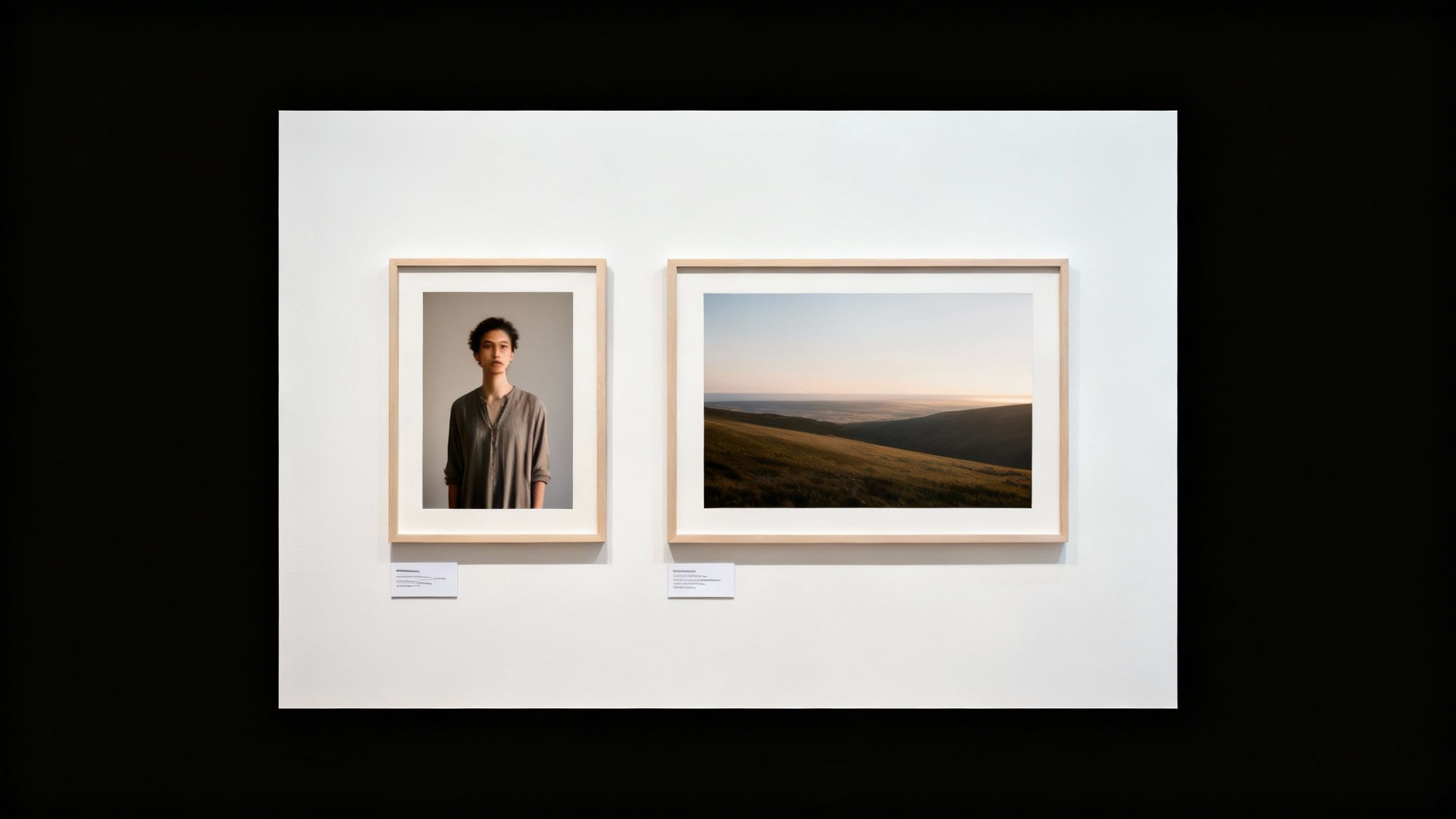
At its core, the difference between portrait and landscape is all about orientation. Portrait is vertical—taller than it is wide—while landscape is horizontal, meaning it's wider than it is tall. This isn't just about turning your camera sideways; it's a foundational strategic decision that completely shapes the story your image will tell and its commercial viability in a visually driven market.
Portrait vs. Landscape: The Foundational Choice
Choosing between a vertical or horizontal frame is the very first step in visual storytelling. It’s a choice that defines how your subject is presented, how the viewer perceives the scene, and ultimately, how they connect with your work. Think of it less as a technical setting and more as the canvas for your entire creative vision.
This decision ripples through everything that follows, from the rules of composition to the emotional vibe of the final image. As the legendary Ansel Adams once said, “A good photograph is knowing where to stand.” That wisdom extends to knowing which way to orient your camera, because that choice directs the viewer’s eye and builds the narrative. The orientation you pick affects technical details like aspect ratio and resolution, and it's absolutely critical for getting your images right for specific platforms, whether that’s a scrolling social feed or a massive print.
Core Distinctions and Use Cases
The primary function of portrait orientation is to isolate and emphasize a single subject. It narrows the viewer's focus, eliminating peripheral distractions and drawing the eye directly where you want it. This makes it the authoritative choice for:
- Professional headshots and classic individual portraits.
- Fashion and product shots where intricate details are paramount.
- Mobile-first content designed for platforms like Instagram Stories and TikTok.
Conversely, landscape orientation is engineered to capture context and scale. Its wide format is built for showcasing sprawling environments and the relationship between different elements in a scene. It’s the go-to choice for:
- Sweeping scenic shots and travel photography.
- Architectural photos that need to convey the full breadth of a structure.
- Group photos where the environment is as integral to the story as the people.
Mastering these fundamental differences is key, especially when you're using powerful tools like an AI portrait generator. The AI relies on a smart orientation choice to deliver truly compelling results.
Orientation At a Glance
To make it even clearer, here’s a quick breakdown of how these two orientations stack up.
| Attribute | Portrait Orientation | Landscape Orientation |
|---|---|---|
| Primary Shape | Vertical (Taller than wide) | Horizontal (Wider than tall) |
| Best For | Single subjects, focus, intimacy | Expansive scenes, context, groups |
| Common Use Cases | Headshots, mobile video, fashion | Scenery, architectural, cinema |
| Psychological Impact | Strength, power, directness | Calm, spaciousness, stability |
This little cheat sheet should help you decide in a pinch, but remember that the best choice always comes back to the story you want to tell.
Understanding Technical Differences and Aspect Ratios
It’s about more than just turning your camera sideways. The real difference between portrait and landscape is a technical one, and it all comes down to aspect ratio. Think of aspect ratio as the proportional relationship between an image's width and height—basically, the shape of your digital canvas. Getting this right from the start is what separates an amateur shot from a professional one.
Each orientation plays by its own rules, and those rules are set by the screens we use every day. For a wide, landscape image, you'll commonly see ratios like:
- 16:9 — This is the undisputed standard for modern screens. It's the native format for HDTVs, computer monitors, and almost all cinematic video.
- 3:2 — The classic photographer's ratio. It's the native format for most DSLR and mirrorless cameras, a direct legacy of 35mm film.
- 4:3 — A bit more square, this ratio was the standard for older televisions and is still used by some digital cameras and tablets, including the iPad.
Portrait mode simply inverts these ratios. That 16:9 landscape becomes a 9:16 portrait, a format that absolutely dominates mobile-first platforms like Instagram Stories and TikTok.
Why Cropping Later Is a Bad Idea
Here’s one of the biggest mistakes novice photographers make: trying to force a landscape photo into a portrait frame after the fact. When you do that, you're not just changing the shape—you are permanently discarding significant pixel data from the sides. This is a surefire way to compromise your image quality.
"The pixel is the irreducible atom of photography in the digital age. Cropping is the act of throwing those atoms away. To preserve maximum fidelity, compose in-camera for your final orientation." — David duChemin, photographer and best-selling author.
This loss of resolution can turn a sharp, beautiful image into something blurry and unusable, especially for large prints or high-definition screens. Plan your shot in the right orientation from the get-go. You’ll thank yourself later when you have maximum quality for any use case, whether it’s a tiny profile picture or a massive framed print. If you're serious about post-processing, it helps to have the right tools; check out these 12 Best Portrait Editing Software Options for 2025.
Following the Money: Global Trends and Market Demands
Your choice of orientation isn't just about art; it's also about business. Market trends and consumer habits play a huge role. For example, the Asia-Pacific region is dominating the professional photography market with a 35% share, and a lot of that is driven by a massive demand for portraiture.
In fact, portrait photography is a giant, pulling in an estimated $20.6 billion every year across the globe. Why? Because people are looking for a personal, high-quality touch that their smartphones just can’t deliver yet. These photography industry statistics paint a clear picture: mastering portrait orientation is non-negotiable for any pro who wants to meet this huge and growing global demand.
How Orientation Shapes Composition and Storytelling
Let's move past the tech specs for a minute. The real magic—and the biggest difference—between portrait and landscape orientation is how it shapes the story you’re telling. Choosing an orientation isn't just a practical decision; it’s the very first brushstroke that defines how someone will connect with your image, both emotionally and psychologically.
This isn’t a new concept. It's a choice artists have been making for centuries, and it’s still a huge deal in professional photography today. In fact, portrait orientation is the heavyweight champion, making up around 40% of all professional shoots worldwide. Meanwhile, landscape is quietly gaining ground with a steady 4% annual growth rate, mostly thanks to its dominance in travel and architectural photography. If you’re a numbers person, you can dig into more of these photography industry statistics to see how the pros are leaning.
The Intimacy of Portrait Orientation
Portrait mode is all about focus. It’s designed to zero in, isolate, and magnify a subject. By squeezing the frame vertically, it forces a viewer's eye right where you want it: on your subject. This creates an immediate, almost personal connection. It's no coincidence that this format perfectly mirrors the human form, making it the go-to for capturing strength, personality, and elegance.
Think about a classic headshot. The vertical frame cuts out all the background noise, pulling you straight into the subject's expression. It feels like a one-on-one conversation. In fashion, a tall, narrow shot emphasizes the sleek lines of an outfit and the model's confident posture.
Famed photographer Philippe Halsman once said, "When you ask a person to jump, his attention is mostly directed toward the act of jumping and the mask falls so that the real person appears." Portrait orientation works in a similar way—it strips away distractions to reveal the true essence of the subject.
This is why portrait orientation is a powerhouse for:
- Emotional Punch: When your subject fills the frame, their emotions—joy, intensity, vulnerability—are dialed up to eleven.
- Highlighting Details: It forces you to notice the little things, like the texture of a fabric or the sparkle in someone's eye, that would get lost in a wider scene.
- Conveying Power: A subject framed vertically can feel more dominant and commanding. It's a classic trick used in portraiture to make someone look larger than life.
The Expansive Narrative of Landscape Orientation
If portrait orientation is a close-up, landscape is the wide-angle shot. Its broad, horizontal frame is built for context, environment, and scale. It doesn't just show you who or what—it shows you where they are in the world. This format invites your eyes to wander across the frame, soaking in the atmosphere and the bigger picture.
Picture a mountain range photographed in landscape. You instantly feel its immense scale and the raw, untamed beauty of nature. Or a sprawling cityscape at night, where the wide frame captures the vibrant energy of the entire urban jungle. Even in a simple group photo, landscape orientation is what establishes the connection between people and their surroundings.
It's the orientation of choice for epic stories, sweeping vistas, and shared moments.
Choosing the Right Orientation for Each Platform
Picking the right orientation isn’t just an artistic choice—it's a strategic one. Where your photo or video ends up is just as important as what’s in it, and the difference between portrait and landscape can make or break your content's engagement. Every platform has its own layout and user habits, which means one orientation will almost always perform better than the other.
This is especially true now that we live in a mobile-first world. According to data from Statcounter, mobile devices account for nearly 60% of all web traffic worldwide, and users hold their phones vertically about 94% of the time. That single statistic has completely flipped the script for creators. If you ignore it, you’re essentially putting a barrier between your work and your audience by forcing them to turn their device just to see your content properly.
Social Media: A Vertical World
Let’s be honest: social media is a vertical game now. Platforms like Instagram, TikTok, and Snapchat are built around a vertical scrolling feed, so portrait content feels natural and looks way more immersive.
- Instagram (Stories & Reels): You absolutely need a 9:16 portrait aspect ratio. It fills the entire mobile screen, creating a captivating view that keeps people watching longer. Post a landscape video here, and it gets shrunk down with ugly black bars on the top and bottom.
- TikTok: This platform is 9:16 portrait video. Using anything else is a rookie mistake. It immediately signals to both the algorithm and users that your content wasn't made for TikTok, and it will likely get ignored.
- Instagram (Feed): The main feed offers a bit more flexibility, but a 4:5 portrait orientation is your best bet. It takes up significantly more screen space than a square (1:1) or landscape (1.91:1) post, grabbing more attention as people scroll by.
If you're a marketer trying to connect with your audience on these platforms, diving into different vertical video marketing strategies is a must.
Websites and Traditional Video Platforms
While social media has gone vertical, landscape orientation is still king in other digital spaces. It remains the undisputed standard for creating that wide, cinematic feeling on larger screens.
An Animoto study found that even on their phones, viewers are 1.5 times more likely to flip their device horizontally for a more immersive experience when watching longer videos on sites like YouTube.
So, how do you decide? It often boils down to your subject. This simple flowchart can help guide your choice.
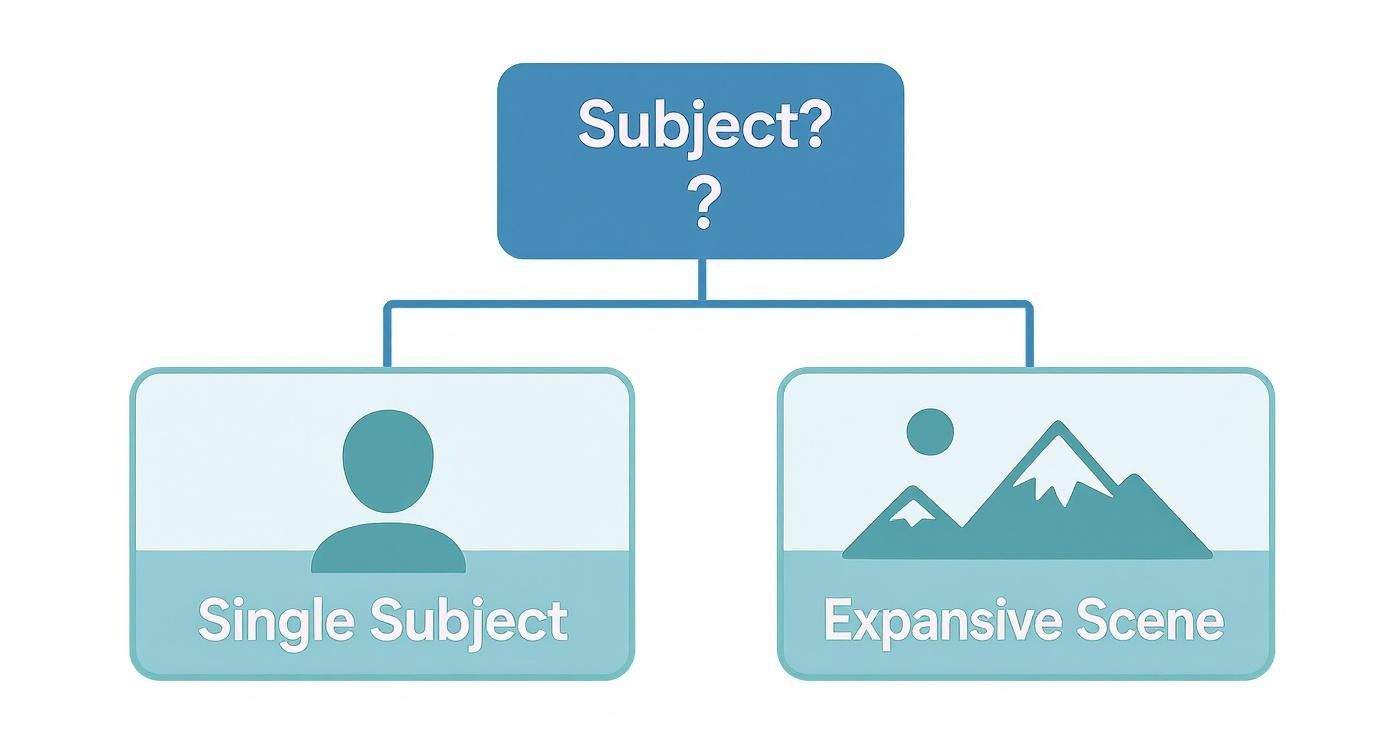
The graphic makes the core decision pretty clear: go with portrait when you have a single, focused subject, and choose landscape when you want to capture a wide, sweeping scene.
For your website, using a mix is usually the best approach. A wide 16:9 landscape image is perfect for a hero banner at the top of a page, while portrait images work great for things like team headshots or inline blog photos.
And for the video creators out there, 16:9 landscape is the unbreakable rule for standard YouTube content. The platform’s entire interface is built around that cinematic format. However, when it comes to Shorts, vertical is the only way to go. You can use tools like our AI TikTok video generator to quickly create vertical clips that are perfect for grabbing attention on Shorts.
Optimal Orientation by Platform
To make it even clearer, here’s a quick-reference table that breaks down the best orientation for today’s most popular platforms.
| Platform | Recommended Orientation | Key Considerations |
|---|---|---|
| TikTok | Portrait (9:16) | The platform is 100% vertical-first. Using any other orientation will severely limit your reach and engagement. |
| Instagram Reels/Stories | Portrait (9:16) | Fills the entire screen for an immersive experience. Landscape content gets awkwardly cropped or displayed with black bars. |
| Instagram Feed | Portrait (4:5) | Takes up the most vertical space in the feed, making your posts more prominent and eye-catching as users scroll. |
| YouTube (Standard Video) | Landscape (16:9) | This is the cinematic standard for long-form content. Viewers expect and prefer horizontal video here. |
| YouTube Shorts | Portrait (9:16) | Exclusively designed for vertical, short-form video. Landscape content is not supported and won't perform well. |
| Facebook Feed | Portrait (4:5) or Square (1:1) | While flexible, vertical (4:5) performs best on mobile feeds by maximizing screen real estate. |
| Website Banners | Landscape (16:9) | The wide format is ideal for hero images and banners that stretch across the top of a webpage. |
Choosing the right format is the first step to making sure your content gets seen and appreciated the way it was intended. Always think about where your audience will be viewing your work before you even start creating.
Getting Your Orientation Right in DreamShootAI
Knowing the difference between portrait and landscape is one thing, but actually applying that knowledge is where the magic happens with DreamShootAI. When you choose an orientation, you’re giving our AI direct instructions on what to focus on, making sure the final image is exactly what you had in mind. Nailing this simple, foundational step is everything.
The real world of professional photography backs this up. In North America's photo services market, portrait photography isn't just a small slice of the pie—it's a massive 29.4% of all revenue. And who’s driving that demand? Individual consumers, making up 61.3% of the market, all looking for those powerful personal branding shots and milestone photos that only a focused, vertical frame can truly capture.
For Killer Headshots and Virtual Try-Ons, Go Vertical
When the goal is to put a single person front and center, portrait orientation is the only way to go. This is especially true for professional headshots and our Virtual Try-On feature.
- Professional Headshots: A vertical frame automatically isolates the person, cutting out distracting backgrounds and pulling all the focus to their expression. It’s the secret sauce for a LinkedIn profile that commands attention or a corporate bio photo that looks sharp and professional.
- Virtual Try-On: To get a realistic preview of an outfit, whether for a wedding dress or a new style, the AI needs to concentrate on the human form. Portrait orientation gives it the perfect canvas, keeping every detail of the clothing clear and perfectly centered.
If you were to use landscape for these, you'd be telling the AI to create a wider, more scenic shot, which completely defeats the purpose. For a deeper dive on this, check out our guide on what makes a great AI headshot generator.
For Group Shots and Brand Stories, Go Wide
While portrait mode is the master of individual focus, landscape orientation is your best friend for telling a bigger story. It’s the perfect choice for creating images where the setting or the group dynamic is just as important as the individuals in the shot.
"Composition is the art of arranging the elements of a picture. The choice between a vertical and horizontal frame is the first and most fundamental act of that arrangement." - Michael Freeman, Photographer and Author
Think about using landscape orientation in DreamShootAI when you want to create:
- Team Photos: A wide frame lets the AI place your team in a professional or creative environment, giving off a vibe of collaboration and shared purpose.
- Brand and Lifestyle Imagery: For that perfect website banner or social media post, a landscape image can build an entire atmosphere, communicating your brand’s personality far more effectively than a simple portrait ever could.
By making a conscious choice based on your goal—whether it's a powerful headshot or an immersive brand narrative—you give DreamShootAI the exact instructions it needs to generate stunning, purpose-built images every single time.
Common Questions About Image Orientation
Even after getting the hang of portrait and landscape, a few specific questions always seem to pop up. Let's tackle the most common ones and clear up any confusion so you can feel confident in your creative choices.
Can I Crop a Landscape Photo to Portrait?
The short answer is yes, you can. The better question is should you? When you crop a wide landscape photo into a tall portrait frame, you're essentially throwing away huge chunks of the image from the sides. This isn't just a simple trim; it fundamentally changes the composition and can remove the very context that made the photo work in the first place.
But the biggest hit is to your image quality. Every pixel you chop off degrades the resolution, making the final photo look soft or pixelated on high-definition screens or in large prints. While it might save you in a pinch, it's always best to shoot for the orientation you plan to use. As photographer Chase Jarvis famously said, "The best camera is the one that's with you," but the best shot is the one you compose correctly from the start.
If you absolutely have to crop, make sure you’re starting with the highest-resolution file possible. It won't prevent quality loss, but it will minimize the damage.
Is One Orientation Inherently Better Than the Other?
Not a chance. Neither orientation is "better"—they're just different tools for different jobs. The right choice always comes down to three things: your subject, your story, and where the final image will be displayed. It’s a classic case of form following function.
Portrait orientation is your go-to for creating intimacy. It hones in on a single subject, feels direct and powerful, and cuts out distractions. On the flip side, landscape is unbeatable for showing off expansive scenes, giving your subject context, and conveying a feeling of stability and scale. A smart creator doesn’t play favorites; they figure out what they want to achieve and pick the orientation that gets them there.
How Does Orientation Affect Video Content?
For video, orientation is everything. It can make or break the viewer's experience and dramatically impact how well your content performs on different platforms.
- Landscape (16:9): This is the gold standard for anything cinematic. It's how we're wired to watch movies, TV shows, and content on platforms like YouTube. It just feels natural and immersive.
- Portrait (9:16): With everyone glued to their phones, vertical video has become a powerhouse. Platforms like TikTok and Instagram Reels are built for it, and the data is clear: vertical videos get watched to the end far more often because they fill the entire screen without anyone having to tilt their phone.
A fascinating study from MediaBrix drove this point home, revealing that fewer than 30% of users will bother to turn their phones sideways to watch a horizontal ad. That number alone shows why creating content specifically for vertical, mobile-first platforms is no longer optional.
Forcing a horizontal video into a vertical space (or vice-versa) just looks sloppy. It signals to the viewer that the content wasn't made for them or the platform they're on, which is a surefire way to lose their attention.
Which Orientation Is Best for Printing Photos?
There's no single right answer here—it all depends on the photo itself and where you plan to display it. But there are definitely some solid guidelines to follow.
If you’re printing a classic portrait, a family photo for the mantelpiece, or any shot where one person is the star, portrait orientation is almost always the way to go. It just feels right. For sweeping landscapes, city skylines, or big group photos where the setting is just as important as the people, landscape lets you capture that grand scale.
Here's the critical part: pay attention to standard print sizes (like 4x6, 5x7, or 8x10 inches). Make sure your photo’s aspect ratio matches the dimensions of the print you're ordering. If they don't match, the print lab's automated system will often make its own cropping decisions for you, and you might not like the results.
Ready to create stunning, perfectly oriented photos for any occasion? With DreamShootAI, you can generate professional-quality headshots, romantic couple photos, and dynamic brand imagery in minutes. Stop worrying about camera settings and start creating your vision. Explore the possibilities at DreamShootAI today!
Written by Jocelyn Grey for the DreamShootAI blog.
Spotted something out of date? Tell us at [email protected] and we'll fix it.