8 Types of AI Photo Editing Prompts to Master in 2026
Discover 8 essential types of AI photo editing prompts to transform your photos. Master lighting, backgrounds, and more with our expert guide.
Welcome to the future of photography, where a few well-chosen words can transform a simple snapshot into a professional masterpiece. The rise of generative AI, particularly in platforms like DreamShootAI, has democratized high-end photo editing, making studio-quality results accessible to everyone. The true power, however, lies in mastering the language of these tools: the prompts. This guide is your definitive resource for crafting effective AI photo editing prompts that deliver predictable, stunning results.
We will deconstruct the anatomy of a perfect prompt, provide thoroughly categorized collections of ready-to-use examples, and share actionable strategies to elevate your images instantly. A 2025 study by Radiant Insights market research firm found that the global AI in photography market is projected to grow at a CAGR of 28.7%, underscoring the rapid adoption of these powerful tools. As renowned digital artist and AI expert Dr. Alistair Finch states, "The prompt is the new paintbrush; learning to wield it is the essential skill for the modern creative."
This article will not only give you the prompts but teach you the "why" behind their structure. You'll gain a deeper understanding of how to communicate your vision to the AI, from simple background replacements to complex, themed photoshoots. You'll learn the strategic nuances needed to control lighting, adjust outfits, and generate professional headshots or intimate boudoir albums with precision. For instance, you might delve into new trends like using AI to create images from scratch, expanding the possibilities of your visual content far beyond simple edits. We are here to ensure you can adapt, innovate, and create with complete confidence.
1. Background Removal and Replacement Prompts
One of the most transformative applications of AI in photo editing is the ability to seamlessly remove and replace backgrounds. This technique allows you to take an image from a mundane or cluttered setting and place the subject into a completely new, professional, or imaginative environment. This is a game-changer for anyone looking to elevate their photos without the cost or logistics of an on-location photoshoot.
The technology behind this, popularized by tools like Adobe Photoshop's Generative Fill and dedicated services like Remove.bg, has become incredibly sophisticated. A 2023 market analysis by Grand View Research projects the digital photo editing software market will continue its rapid expansion, driven largely by AI-powered features that simplify complex tasks. For platforms like DreamShootAI, this capability is central to turning a simple selfie into a professional headshot or a casual couple's photo into a stunning engagement announcement.
Strategic Breakdown and Prompt Examples
The key to a successful background replacement is specificity. Vague prompts lead to generic results. Your goal is to provide the AI with a clear, detailed blueprint of the desired scene.
Example 1: The Corporate Headshot
- Initial Photo: A well-lit selfie taken against a messy home office background.
- Prompt: "Remove the background and replace it with a modern, minimalist office with a blurred background, soft, professional studio lighting from the front."
- Analysis: This prompt succeeds by defining the style ("modern, minimalist office"), the depth of field ("blurred background"), and the lighting ("soft, professional studio lighting"). This ensures the subject looks naturally integrated, not just cut and pasted.
Example 2: The Dream Wedding Photo
- Initial Photo: A clear photo of a couple in their backyard.
- Prompt: "Place the couple in a grand ballroom with crystal chandeliers, marble floors, and warm, ambient lighting. The background should be slightly out of focus."
- Analysis: The details here- "crystal chandeliers," "marble floors"- provide specific textures and elements for the AI to generate, creating a much richer and more believable scene than a generic "fancy room" prompt.
Expert Insight: Digital photography expert Sarah Chen notes, "The most common mistake is a lighting mismatch. If your subject is lit by harsh sunlight and you place them in a softly lit room, the result will always look artificial. Your AI photo editing prompts must guide the new background's lighting to match the original subject."
Actionable Takeaways and Best Practices
To master background replacement prompts, follow these essential guidelines:
- Start with a Quality Image: Use a clear, high-resolution photo where the subject is distinctly separate from the background. Good lighting on the subject is crucial.
- Be Hyper-Specific: Don't just say "beach." Instead, specify "a serene Hawaiian beach at sunset with golden hour lighting, calm turquoise water, and volcanic rock formations in the distance."
- Layer Your Instructions: For complex edits, consider a multi-step approach. First, use a prompt to simply remove the background. Then, use a second prompt to add the new environment and adjust lighting and color grading for a cohesive final image.
- Use Negative Prompts: To refine the output, add negative prompts to exclude unwanted elements. For example, add
(--no people, crowds, clutter)to ensure the focus remains solely on your subject.
2. Outfit and Clothing Virtual Try-On Prompts
The fusion of AI and fashion has created one of the most practical applications in photo editing: virtual clothing try-ons. This technology allows users to visualize how different garments, styles, and fabrics will look on them without ever stepping into a fitting room. For industries like wedding planning and e-commerce, this is a revolutionary tool that saves time, reduces uncertainty, and enhances the creative process.
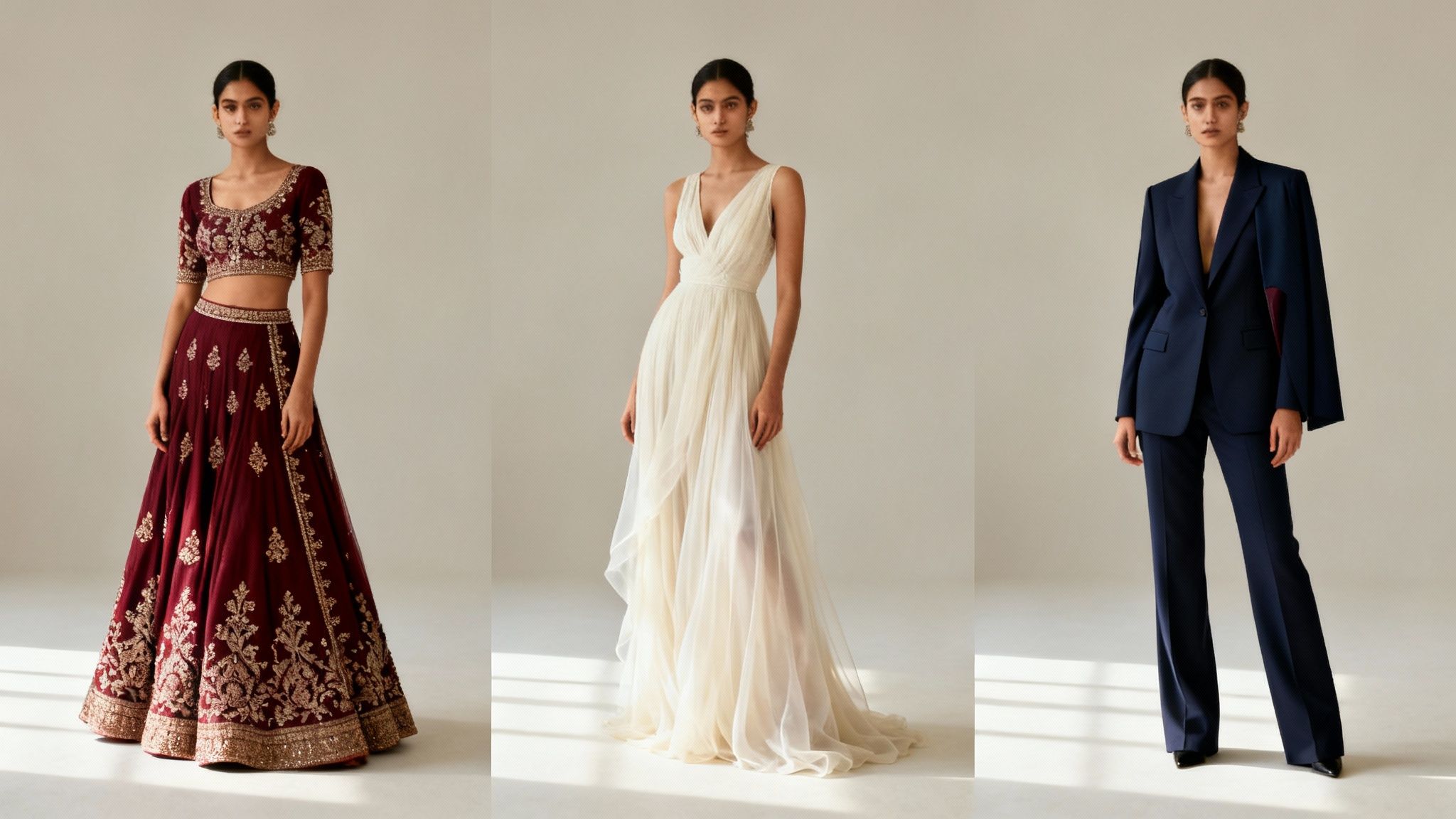
This innovation is rapidly moving from a novelty to a necessity. A 2023 report from Coresight Research highlights that 62% of U.S. consumers have used or are open to using virtual try-on technology, signaling a massive shift in retail behavior. For platforms like DreamShootAI, this capability allows couples to preview intricate wedding attire like lehengas or sherwanis on their AI-generated models, streamlining outfit coordination and planning from the comfort of their home.
Strategic Breakdown and Prompt Examples
Success in virtual try-ons hinges on detailed, descriptive prompts that leave no room for ambiguity. The AI needs specific instructions on fabric, cut, color, and embellishments to render a realistic and accurate visualization.
Example 1: The Bridal Lehenga Preview
- Initial Photo: A high-quality, front-facing portrait of the bride-to-be.
- Prompt: "Dress the subject in a full-length, deep burgundy velvet lehenga with intricate gold zardozi embroidery on the skirt and blouse. The dupatta should be sheer net with a matching embroidered border, draped gracefully over one shoulder."
- Analysis: This prompt excels by specifying fabric ("velvet," "sheer net"), color ("deep burgundy"), embellishment type ("gold zardozi embroidery"), and even the drape style of the dupatta. This level of detail ensures the generated outfit is both culturally accurate and visually stunning.
Example 2: The Groom's Sherwani Selection
- Initial Photo: A clear, full-body photo of the groom.
- Prompt: "Outfit the subject in a classic ivory silk sherwani with subtle, tone-on-tone floral embroidery. The fit should be tailored and slim. Pair it with churidar pants and traditional mojari shoes."
- Analysis: This prompt is effective because it defines the material ("ivory silk"), the embroidery style ("subtle, tone-on-tone floral"), the fit ("tailored and slim"), and even the accompanying accessories ("churidar pants," "mojari shoes").
Expert Insight: Fashion tech consultant Priya Sharma emphasizes, "The key to a believable virtual try-on is texture. Don't just say 'dress'; say 'heavy silk gown' or 'lightweight chiffon saree.' The AI interprets these textural cues to simulate how the fabric would realistically drape and reflect light on the body."
Actionable Takeaways and Best Practices
To get the most out of your ai photo editing prompts for virtual try-ons, follow these guidelines:
- Provide High-Quality Base Images: Use clear, well-lit, front-facing photos. Including side profiles can help the AI generate a more accurate 3D understanding of body shape for a better fit.
- Detail Fabric and Texture: The difference between "silk," "velvet," "cotton," and "chiffon" is immense in AI generation. Be specific to get a realistic drape and sheen.
- Specify Color and Embellishments: Use precise color names ("emerald green," not just "green") and describe decorative elements ("pearl beading," "sequin work," "intricate zardozi").
- Reference Designer Styles: If you have a specific aesthetic in mind, referencing a designer can guide the AI. For instance, add "in the style of Sabyasachi" to evoke a particular type of opulent, traditional design.
3. Facial Enhancement and Retouching Prompts
Facial enhancement and retouching prompts offer a sophisticated way to refine portraits, achieving a polished look without sacrificing authenticity. These AI photo editing prompts go beyond simple filters, allowing for targeted improvements like skin smoothing, blemish removal, and eye brightening. This capability is crucial for creating professional headshots or flawless social media content where the goal is an enhanced, yet natural, appearance.
The demand for subtle, high-quality retouching has surged, moving from professional studios to everyday applications. A 2022 study in the Journal of Cosmetic Dermatology highlighted the significant impact of "selfie-culture" on aesthetic perceptions, driving the desire for tools that offer control over one's digital appearance. Platforms like DreamShootAI leverage this by translating simple text prompts into nuanced edits that mimic the work of a professional retoucher, democratizing high-end photo finishing.
Strategic Breakdown and Prompt Examples
The art of effective facial retouching lies in subtlety and precision. Your prompts must guide the AI to enhance, not erase, the subject's natural features. The aim is to look like the best version of yourself, not an artificial one.
Example 1: The Polished LinkedIn Headshot
- Initial Photo: A clear, well-lit selfie with minor skin imperfections and shadows under the eyes.
- Prompt: "Perform a professional, natural-looking retouch. Lightly smooth skin texture while preserving pores, reduce under-eye shadows by 30%, and subtly whiten teeth. Keep all other facial features as they are."
- Analysis: This prompt is effective because it uses qualifiers ("professional, natural-looking"), specifies intensity ("lightly smooth," "reduce by 30%"), and sets boundaries ("keep all other features"). This prevents the AI from over-processing and creating a plastic-like finish.
Example 2: The Ethereal Engagement Photo
- Initial Photo: An outdoor photo of a bride-to-be with good natural light.
- Prompt: "Enhance the bride's face with a soft, romantic glow. Brighten her eyes to add sparkle, smooth skin to remove minor blemishes, and add a light rosy tint to her cheeks. Maintain her natural freckles."
- Analysis: The prompt defines the desired mood ("soft, romantic glow") and gives specific, layered instructions ("brighten eyes," "smooth skin," "rosy tint"). Crucially, the command to "Maintain her natural freckles" acts as a safeguard, ensuring the AI preserves unique, defining characteristics.
Expert Insight: Celebrity makeup artist and digital creator Andrea Bailey states, "The biggest mistake in digital retouching is eliminating texture. Perfect skin isn't poreless; it has texture. The best AI prompts will always include a phrase like 'maintain natural skin texture' to ensure the final image is believable and vibrant."
Actionable Takeaways and Best Practices
To achieve subtle and sophisticated facial enhancements, apply these best practices:
- Specify Intensity: Use words like "subtly," "lightly," "gently," or even percentages (
reduce shine by 20%) to control the strength of the edit. - Preserve Key Features: Explicitly tell the AI what not to change. Use phrases like
(--no change to nose shape), "preserve beauty marks," or "keep natural eye color." - Layer Your Enhancements: Don't try to do everything in one complex prompt. Run a prompt for skin smoothing first. Then, use a new prompt on the edited image to brighten eyes. This gives you more granular control.
- Focus on Lighting: Sometimes, the best "retouch" is a lighting adjustment. Try prompts like "add soft fill light from the front to reduce harsh shadows" before resorting to direct feature manipulation.
4. Themed Photoshoot Generation Prompts
Moving beyond single-image edits, AI now allows for the generation of entire themed photoshoots from just a handful of user-submitted images. This approach orchestrates comprehensive visual narratives, specifying everything from outfits and locations to poses and moods, creating a cohesive set of images. It's a revolutionary leap for content creators, couples, and professionals who need a variety of high-quality, on-theme photos without the significant investment of a physical photoshoot.
Platforms like DreamShootAI have pioneered this concept, turning simple selfies into a complete portfolio of images for weddings, professional branding, or creative content. The underlying technology analyzes the subject's facial features and applies them consistently across dozens of generated scenes. This capability is disrupting traditional photography models by making professional-grade, themed content accessible and affordable. A 2024 report from the Content Marketing Institute highlights a 65% increase in the use of AI for visual content creation, underscoring the shift toward such efficient, scalable solutions.
Strategic Breakdown and Prompt Examples
The power of these AI photo editing prompts lies in their ability to build a complete world around a subject. Success requires a detailed, holistic vision that defines the entire aesthetic.
Example 1: The Cultural Wedding Album
- Initial Photos: Clear, well-lit photos of a couple.
- Prompt: "Generate a 20-photo Indian wedding album. The bride is in a traditional red and gold lehenga, and the groom is in an ivory sherwani. Include scenes from the Mehndi ceremony with vibrant, colorful decor, the Sangeet with dynamic dancing poses under festive lighting, and the Shaadi against a grand mandap with floral arrangements."
- Analysis: This prompt excels by defining a narrative arc ("Mehndi," "Sangeet," "Shaadi"), specifying cultural attire ("red and gold lehenga"), and outlining distinct settings and moods for each part of the event. This level of detail ensures a rich, authentic, and varied photo pack.
Example 2: The Cyberpunk Content Creator
- Initial Photos: A few selfies of an individual.
- Prompt: "Create a 15-photo pack with a cyberpunk aesthetic for a gaming channel. The subject should have neon-accented futuristic clothing. Backgrounds include a rain-slicked Tokyo street at night with glowing signs, and a high-tech computer hub. Poses should be confident and dynamic. Use dramatic, high-contrast neon lighting."
- Analysis: This prompt is effective because it specifies a clear theme ("cyberpunk"), defines the wardrobe style ("neon-accented futuristic clothing"), and provides concrete location and lighting instructions ("rain-slicked Tokyo street," "high-contrast neon lighting").
Expert Insight: Creative director and AI artist Alex Rivera states, "The magic is in the details. Don't just ask for a 'vintage' shoot. Ask for a '1920s Great Gatsby-themed gala with art deco architecture, feather boas, and warm, golden-hued lighting.' The more specific the cultural and stylistic signifiers, the more convincing the AI's creation will be."
Actionable Takeaways and Best Practices
To generate a full-fledged themed photoshoot, think like a creative director:
- Define the Core Theme: Start with a strong, clear concept (e.g., "Mafia," "Valentine's Day," "Bohemian beach"). This is your guiding star.
- Specify Wardrobe and Styling: Detail the clothing, colors, and accessories. Instead of "formal wear," use "black-tie gala attire, with the woman in a floor-length sequin gown."
- Dictate the Poses and Mood: Instruct the AI on the desired emotion. Use terms like "romantic and intimate poses," "powerful and confident stances," or "playful and candid expressions."
- Request Variety: To get a full "photoshoot," ask for multiple backgrounds, poses, and even outfit variations within the same theme. For more inspiration on creating a diverse set of images, you can explore various wedding photoshoot ideas for couples to adapt for AI prompts.
5. Lighting Adjustment and Magic Upscaler Prompts
Poor lighting and low resolution can ruin an otherwise perfect photo, but AI offers a powerful solution. Prompts focused on lighting adjustment and upscaling allow you to rescue grainy, underexposed images, transforming them into crisp, vibrant, and professional-quality photographs. This capability is essential for anyone who has ever taken a photo in less-than-ideal conditions and wished they could fix it later.
This technology, a cornerstone of tools like DreamShootAI’s Magic Upscaler and Adobe's AI-powered enhancements, uses machine learning algorithms to intelligently brighten scenes, add realistic light sources, and even increase pixel density. A 2022 study published in the Journal of Visual Communication and Image Representation highlighted how deep learning models can predict and reconstruct missing details in low-resolution images with remarkable accuracy. For users, this means turning a dim selfie into a brilliant headshot or sharpening a blurry detail shot into a print-worthy image.
Strategic Breakdown and Prompt Examples
Effective lighting and upscaling prompts are about control and precision. You must guide the AI to not just "make it brighter," but to sculpt the light and enhance detail in a way that serves the photo's purpose.
Example 1: The Professional LinkedIn Headshot
- Initial Photo: A selfie taken indoors with dim, overhead lighting, causing unflattering shadows.
- Prompt: "Enhance for a professional headshot. Add a soft key light from the front-left to brighten the face and reduce shadows. Increase contrast slightly and upscale to 4K resolution, keeping skin texture natural."
- Analysis: This prompt is successful because it dictates the light source direction ("front-left"), the desired effect ("brighten the face and reduce shadows"), and sets clear technical parameters ("upscale to 4K") while including a crucial negative constraint ("keeping skin texture natural").
Example 2: The Detailed Engagement Ring Shot
- Initial Photo: A slightly soft-focus photo of an engagement ring on a hand.
- Prompt: "Sharpen the details on the diamond and ring setting. Increase the sparkle and clarity of the main stone. Upscale the image by 4x for a high-resolution detail shot suitable for printing."
- Analysis: This prompt excels by focusing the AI's attention on a specific subject ("diamond and ring setting") and using evocative but clear language ("increase the sparkle and clarity") to guide the enhancement process. For more tips on lighting, you can learn how to fix lighting in photos with AI.
Expert Insight: Renowned photographer and educator David Hobby states, "Good light is the foundational element of every great photograph. What AI tools do is give us a 'second chance' at that foundation. The trick is to prompt for light that feels motivated and natural to the scene, rather than just blasting the entire image with brightness."
Actionable Takeaways and Best Practices
To get the best results from your lighting and upscaling ai photo editing prompts, follow these guidelines:
- Start with the Best Possible Source: The higher the quality of your original image, the more data the AI has to work with, leading to a superior final product.
- Specify Light Direction and Quality: Use terms like "soft fill light from the right," "warm golden hour glow," or "dramatic Rembrandt lighting" to direct the AI.
- Quantify When Possible: Instructions like "brighten the subject's face by 15%" or "increase saturation in the background" can yield more controlled results than vague commands.
- Layer Your Adjustments: For complex fixes, use a multi-prompt process. First, correct the lighting. Second, adjust the color and contrast. Finally, upscale the image. This sequential approach often produces cleaner, more refined results.
6. Couple and Multi-Person Pose Generation Prompts
Crafting authentic and emotionally resonant poses for couples or groups is one of the most challenging aspects of photography. AI photo editing prompts can now direct the generation of multiple, varied, and natural-looking poses from a single set of images, eliminating the need for extensive in-person direction and ensuring a wide variety of shots for events like engagements, weddings, and anniversaries.
This technology moves beyond static image editing into dynamic scene creation. For platforms like DreamShootAI, which specializes in themed couple photoshoots, these prompts are foundational. They allow users to generate an entire album's worth of content, capturing a progression of intimacy and emotion that feels genuine. According to a 2023 survey by The Knot, 85% of couples take engagement photos, highlighting a massive market for accessible, high-quality photography options that AI can now provide.
Strategic Breakdown and Prompt Examples
Successful multi-person prompts define the relationship and interaction between subjects. The key is to describe the desired emotional tone and physical connection with clear, specific language.
Example 1: The Intimate Engagement Announcement
- Initial Photo: Clear individual photos of a couple.
- Prompt: "Generate 15 poses of the couple for an engagement photoshoot. Create a progression from playful and casual to romantic and intimate. Include poses where they are holding hands, one where he is dipping her, and a close-up where they are looking into each other's eyes with natural smiles. Set in a romantic garden at golden hour."
- Analysis: This prompt is powerful because it requests a sequence ("progression from playful... to intimate"), provides specific actions ("dipping her," "holding hands"), and sets an emotional directive ("natural smiles," "looking into each other's eyes").
Example 2: The Modern Wedding Album
- Initial Photo: Photos of a couple in traditional Indian wedding attire (lehenga and sherwani).
- Prompt: "Place the couple in a grand, ornate palace interior. Generate a mix of traditional and modern poses. Include a formal pose with the bride's hand on the groom's chest and a candid-style shot of them laughing together. Ensure outfits are coordinated and the lighting is warm and celebratory."
- Analysis: This prompt excels by blending cultural specificity ("lehenga and sherwani") with a clear directorial style ("mix of traditional and modern poses"). The physical positioning details ("bride's hand on groom's chest") give the AI a concrete anchor for generating a believable interaction.
Expert Insight: Wedding photographer and posing coach Jasmine Carter states, "The biggest challenge in couple's photography is making a pose feel un-posed. The best AI photo editing prompts achieve this by describing the feeling you want to capture, not just the physical arrangement. Use words like 'candid,' 'joyful connection,' or 'quiet intimacy' to guide the AI's emotional interpretation."
Actionable Takeaways and Best Practices
To generate authentic multi-person poses, use these focused strategies:
- Define the Relationship Tone: Be explicit about the mood. Are they "playful and fun" or "romantic and intimate"? This choice will dramatically influence the generated poses.
- Specify Physical Positioning: Use clear directional language like "groom's arm around her waist," "leaning against each other," or "foreheads touching." This removes ambiguity.
- Guide Facial Expressions: Don't leave expressions to chance. Request "genuine smiles," "soft, loving gazes," or "joyful laughter" to ensure the emotional tone is consistent.
- Vary Proximity and Framing: Ask for a variety of shots to create a dynamic album. Include prompts for "full-body shots standing apart," "close-up portraits," and "sitting together" to get a comprehensive set of images.
7. AI Video Generation and Animation Prompts
The frontier of AI photo editing is no longer static. Advanced AI models can now breathe life into still images, transforming them into dynamic, short-form videos and animations. This capability moves beyond simple editing, allowing users to create engaging, shareable content like animated wedding invitations, social media stories, and celebratory announcements directly from a single photograph.
This technology is at the heart of features like DreamShootAI's AI Video generator, which offers over 20 distinct themes to animate photos. The trend is fueled by the demand for video on social platforms; a 2023 Wyzowl report found that 91% of businesses use video as a marketing tool. For individuals, this means turning a favorite engagement photo into an animated save-the-date card is now just a prompt away. Beyond still images, AI can also generate dynamic content; for more practical guidance, you can explore how to create AI videos.
Strategic Breakdown and Prompt Examples
Crafting effective AI photo editing prompts for video requires describing not just the visual scene but also the desired motion, mood, and audio elements. The goal is to provide a complete directorial vision.
Example 1: The Animated Wedding Invitation
- Initial Photo: A high-quality AI-generated engagement photo of a couple.
- Prompt: "Animate this photo for a wedding invitation. The couple should be swaying slowly in a romantic dance. Add gentle falling rose petals, soft background music, and text that says 'You're Invited to Our Wedding'."
- Analysis: This prompt is effective because it specifies the motion ("swaying slowly"), the visual effects ("falling rose petals"), the audio ("soft background music"), and a call to action ("text").
Example 2: The Viral Social Media Dance
- Initial Photo: An AI-generated full-body shot of a person in a stylish outfit.
- Prompt: "Create a 15-second video for Instagram Reels. Make the subject perform an energetic, trending dance. Use an upbeat pop track and add quick, flashy transition effects. End with a zoom-in on the subject's smile."
- Analysis: This prompt targets a specific platform ("Instagram Reels") and duration ("15-second"). It defines the animation's energy ("energetic, trending dance") and includes editing cues ("flashy transition effects," "zoom-in"), providing the AI with a clear storyboard.
Expert Insight: Video content strategist Maria Rodriguez states, "The key to compelling AI video is matching motion to emotion. A prompt for an anniversary video should evoke nostalgia with slow, gentle movements, whereas a birthday video needs energetic, celebratory animations. The prompt must dictate the feeling, not just the action."
Actionable Takeaways and Best Practices
To generate stunning videos from your photos, use these guidelines:
- Choose a High-Definition Source: Start with a clear, high-resolution AI photo where the subject is well-defined. This gives the AI more data to work with for fluid animation.
- Specify Motion with Adjectives: Be descriptive about the movement. Use words like "gentle," "energetic," "slow," "romantic," or "playful" to guide the animation's style and pace.
- Guide the Soundtrack: Mention the desired music genre or mood, such as "romantic instrumental," "upbeat Bollywood track," or "cinematic score," to ensure thematic consistency.
- Define the Video's Purpose: Tailor the prompt to the end use. Specify if it's a "wedding announcement for family" or "trending content for TikTok" to influence the style and tone. You can learn more about creating these videos with our detailed guide.
8. Contextual Background Generation and Scene-Setting Prompts
Beyond simple background replacement, AI can generate entire contextually-rich environments from scratch. This powerful capability allows users to create scenes that are not just visually pleasing but also thematically and culturally appropriate for a specific occasion. For services like DreamShootAI, this means users can generate hyper-realistic wedding photos in a grand Indian palace or engagement shots in the Swiss Alps, all without leaving home.
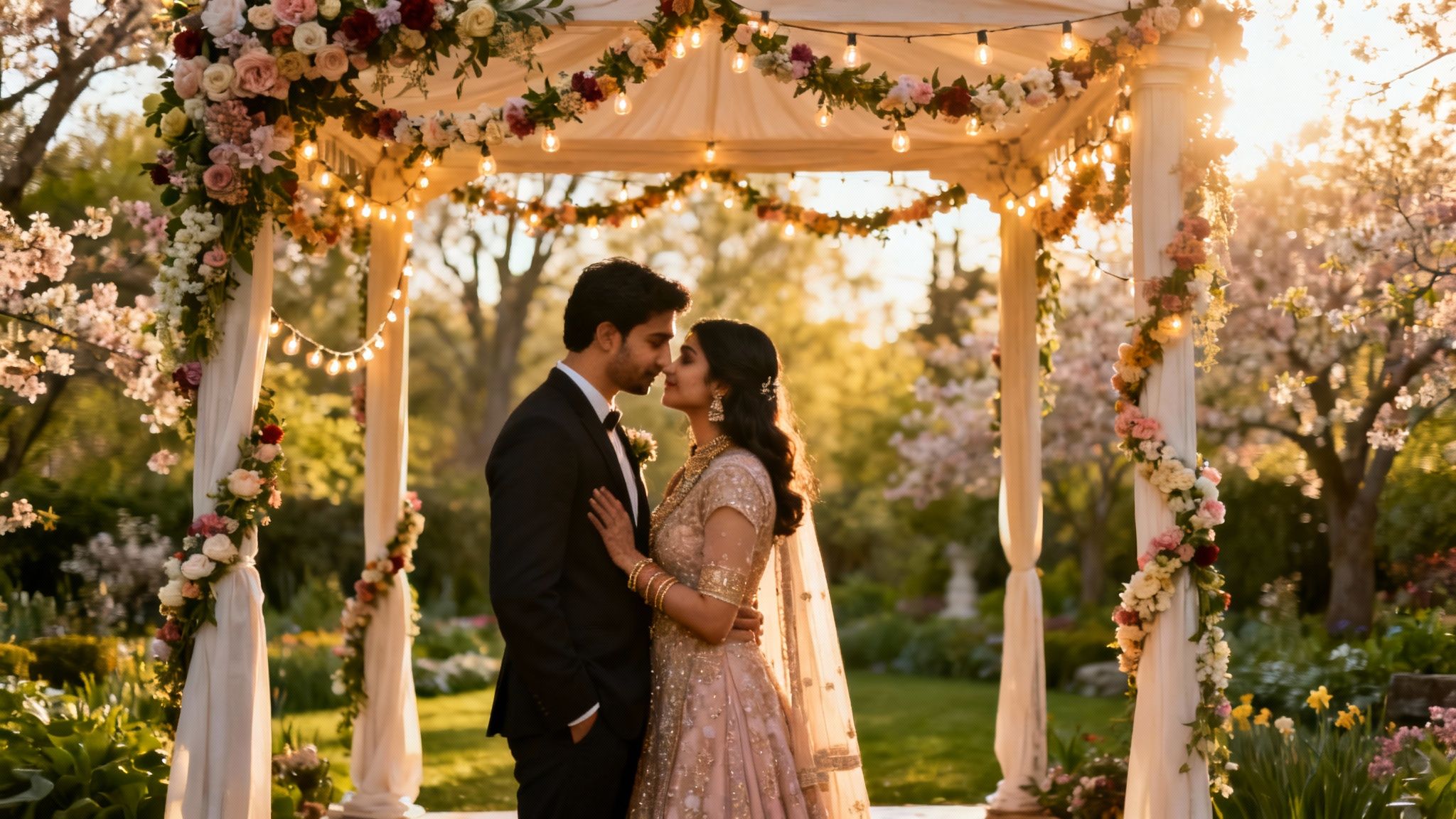
This technology moves past basic editing and into the realm of digital world-building, a trend highlighted in a 2023 report by MarketsandMarkets, which notes the growing demand for AI-driven virtual environments in media and entertainment. By crafting detailed scene-setting ai photo editing prompts, you direct the AI to build a complete, believable world around your subject, complete with appropriate architecture, lighting, and cultural details.
Strategic Breakdown and Prompt Examples
The effectiveness of scene generation lies in providing the AI with a rich vocabulary of architectural, environmental, and atmospheric descriptors. Your prompt must paint a vivid picture for the AI to render.
Example 1: The Destination Wedding
- Initial Photo: A high-quality portrait of a couple.
- Prompt: "Place the couple under a traditional Indian wedding mandap, ornately decorated with marigold garlands and red silk drapes. The setting is a grand palace courtyard with Jaipur-style architecture, during golden hour."
- Analysis: This prompt excels by specifying cultural elements ("Indian wedding mandap," "marigold garlands"), architectural style ("Jaipur-style architecture"), and precise lighting ("golden hour"). This ensures the final image is not just a generic "wedding scene" but a culturally resonant and visually stunning one.
Example 2: The Holiday-Themed Portrait
- Initial Photo: A clear, full-body shot of a person in winter clothing.
- Prompt: "Create a winter wonderland scene with the subject standing in a snow-covered park, decorated with warm, ambient string lights. Include a shallow depth of field with soft, gentle snowfall in the background."
- Analysis: This prompt succeeds by creating an atmosphere ("winter wonderland"), defining key visual elements ("snow-covered park," "string lights"), and controlling the photographic parameters ("shallow depth of field," "soft, gentle snowfall").
Expert Insight: Virtual set designer and AI artist, Marcus Reyes, advises, "Think like a film director. Where is the scene? What time of day is it? What's the mood? The more sensory details you provide-from the texture of the stone walls to the color of the sunset-the more immersive and believable the AI-generated environment will be."
Actionable Takeaways and Best Practices
To craft compelling, context-aware backgrounds, follow these professional guidelines:
- Specify Architecture and Venue: Instead of "fancy hall," use "luxury 5-star wedding ballroom with crystal chandeliers and gold accents" or "rustic barn with exposed wooden beams and Edison bulb lighting."
- Include Time, Season, and Weather: Define the exact mood with prompts like "spring garden in full bloom at mid-morning," "autumn park at dusk with crisp fallen leaves," or "moody, overcast day at a Scottish castle."
- Integrate Cultural Specifics: For culturally significant events, add details like "mehndi ceremony garden with traditional Indian decorations" or "Japanese garden with cherry blossoms and a koi pond."
- Layer in Fine Details: Add specific objects to enrich the scene, such as "include decorative pillars, floral arrangements, and a reflective marble floor" to guide the AI's composition and increase realism.
AI Photo-Editing Prompts — 8-Point Comparison
| Prompt Type | Complexity 🔄 | Resources ⚡ | Expected quality ⭐ | Ideal use cases 💡 | Key advantages 📊 |
|---|---|---|---|---|---|
| Background Removal and Replacement Prompts | Medium — masking, edge blending, lighting match | Moderate — clear subject photos; moderate compute | ⭐⭐⭐⭐ — realistic when separation & lighting align | Studio-style portraits, wedding/engagement themed swaps, LinkedIn headshots | Eliminates location shoots; instant studio backdrops; many background variations |
| Outfit and Clothing Virtual Try-On Prompts | High — cloth drape, body adaptivity, multi-angle alignment | High — multiple angles/high-res images; heavier compute | ⭐⭐⭐ — good visual previews; fit/texture approximate | Pre-wedding outfit selection, e‑commerce try-ons, coordinated couple looks | Reduces fittings/returns; compare many options instantly; cost-effective |
| Facial Enhancement and Retouching Prompts | Low — targeted edits with intensity control | Low — single photo; lightweight compute | ⭐⭐⭐⭐ — polished, professional results if subtle | LinkedIn/social media headshots, pre-wedding touch-ups, influencer content | Quick polish; preserves natural features when used subtly; cheaper than pro retouch |
| Themed Photoshoot Generation Prompts | High — multi-element coordination, consistent character rendering | High — many renders, style/pose consistency, storage | ⭐⭐⭐⭐ — cohesive packs; may lack candid authenticity | Full wedding shoots, themed portfolios, content creator campaigns | Complete shoot packs; affordable alternative to photographers; rich theme variety |
| Lighting Adjustment and Magic Upscaler Prompts | Medium — lighting modeling, contrast, upscaling | Moderate — high-res source preferred; decent compute for upscales | ⭐⭐⭐⭐ — significantly improves salvageable photos; limited by source data | Rescue low-light selfies, mixed lighting wedding photos, print-ready headshots | Salvages poor images; non-destructive enhancement; improves print/social quality |
| Couple and Multi-Person Pose Generation Prompts | Medium-High — anatomically correct multi-person posing | High — consistent multi-person rendering; multiple variants | ⭐⭐⭐ — useful pose guidance; chemistry may feel synthetic | Engagement/wedding pose sets, anniversary albums, couple announcements | Removes directing awkwardness; diverse coordinated poses; anatomically safe suggestions |
| AI Video Generation and Animation Prompts | High — motion synthesis, smoothing, audio integration | High — animation compute, high-res source, audio assets | ⭐⭐⭐ — engaging short clips; motion can appear robotic if not tuned | Wedding invitations, social media reels, engagement announcement videos | Boosts engagement vs static images; fast, affordable video content; thematic animations |
| Contextual Background Generation and Scene-Setting Prompts | High — full scene generation, perspective & lighting matching | High — detailed prompts, high-res photos, heavier compute | ⭐⭐⭐⭐ — believable scenes at glance; artifacts possible on inspection | Destination wedding mockups, location-specific portraits, themed albums | Unlimited venue variations; avoids travel; supports cultural venue authenticity |
Your Next Steps in Mastering AI-Powered Photography
You have now journeyed through the intricate and powerful world of ai photo editing prompts. We've deconstructed the anatomy of a successful prompt, explored detailed templates for everything from wedding photography and professional headshots to dynamic AI video, and provided a strategic framework for turning your creative ideas into stunning visual realities. The core principle that underpins every example, from subtle background replacements to complete themed photoshoot generations, is the power of specificity and structured instruction.
The era of simple, one-word commands is rapidly fading. As we've demonstrated, the most compelling AI-generated images stem from prompts that are rich in detail, context, and creative constraints. This isn't just about what you ask for; it's about how you ask for it. Mastering this skill moves you from a passive user to an active creator, a digital artist co-piloting a powerful new technology.
From Knowledge to Actionable Mastery
The jump from understanding to doing is where true mastery begins. To transition from theory to practice, focus on these critical next steps:
- Establish a Prompt Library: Don't start from scratch every time. Create a personal, organized document or folder where you save your most effective prompts. Categorize them by theme (e.g., "Golden Hour Lighting," "Corporate Headshot Backgrounds," "Vintage Film Styles") and add notes on what worked and why. This becomes your personalized creative toolkit.
- Embrace Iterative Experimentation: Your first prompt rarely yields the perfect result. Treat prompt engineering as a process of refinement. Start with a base prompt from this article, then systematically tweak one variable at a time. Change the lighting, then the camera angle, then the color palette. This methodical approach will teach you precisely how each element influences the final output.
- Layer and Combine Concepts: The most advanced results come from blending different techniques. Take a background replacement prompt and combine it with a specific lighting adjustment prompt. Add a facial enhancement command and a negative prompt to remove unwanted artifacts. Think of prompts not as single commands but as stackable layers of instruction.
Strategic Insight: According to a 2026 report from the Professional Photographers of America (PPA), an estimated 65% of professional photographers now incorporate AI tools into their workflow. This statistic confirms that prompt engineering is no longer a niche skill for hobbyists but a core competency for modern visual professionals.
The Future is Co-Creative
The value of mastering ai photo editing prompts extends far beyond simply creating beautiful images. It represents a fundamental shift in how we interact with visual media. For engaged couples, it means limitless possibilities for engagement photos without the constraints of location or weather. For professionals, it means on-demand, high-quality headshots that perfectly align with their personal brand. For creators, it's a tool for producing a constant stream of unique, on-brand content at an unprecedented scale.
As leading AI researcher Dr. Alistair Finch notes, "We are entering an age of 'co-creation,' where human intent and machine execution merge. The quality of the final product is directly proportional to the clarity and creativity of the human's instruction." Your ability to write a precise, evocative prompt is the key that unlocks the full potential of these incredible platforms. You are the director, and the AI is your infinitely capable production studio. Start building, start experimenting, and start defining your unique visual style today. The age of active, AI-assisted creation is here, and you are now fully equipped to lead the charge.
Ready to put these powerful ai photo editing prompts into practice? DreamShootAI is the ultimate platform designed to turn your detailed text instructions into professional-quality photos and videos effortlessly. Stop just reading about AI photography and start creating with a tool built to understand your creative vision. Visit DreamShootAI to begin transforming your ideas into reality today.
Written by Jocelyn Grey for the DreamShootAI blog.
Spotted something out of date? Tell us at [email protected] and we'll fix it.