A Guide to Add a Beard to a Photo with AI
Discover how to add a beard to a photo with stunning realism using AI. This guide covers choosing photos, crafting prompts, and advanced editing tips.
Adding a beard to a photo once required significant technical skill. Users either relied on unrealistic digital stickers or navigated the steep learning curve of professional photo editing software. That paradigm has shifted. AI-powered tools have completely democratized this process, transforming a technical chore into a swift, creative endeavor.
This is not a minor iteration of old methods; it is a fundamental re-imagining of digital image manipulation.
The adoption of this technology has been explosive. According to research from Everypixel Journal, generative AI now produces over 34 million images daily. Edits like adding facial hair are a significant driver of this trend. This is not a niche interest; the global AI image editor market, valued at USD 88.7 billion, is projected to expand by USD 109.8 million by 2029, according to Technavio's market analysis. These statistics underscore a clear market trajectory: AI-driven photo editing is becoming standard practice.
It All Starts With a Simple Prompt
At the core of this revolution is text-based editing. The complexities of brushes, layers, and manual adjustments are replaced by natural language commands.
To visualize a new look, one simply types a directive: "add a short, trimmed stubble beard" or "generate a thick, salt-and-pepper beard." The AI interprets these instructions and seamlessly integrates the desired facial hair, automatically accounting for critical variables like lighting, shadows, and skin texture.
This represents a quantum leap in efficiency and accessibility for several key reasons:
- Unprecedented Speed: Operations that took a skilled graphic designer hours are now executed in seconds.
- Creative Liberation: Users can experiment with dozens of styles—from a subtle 5 o'clock shadow to a full lumberjack beard—without any prerequisite technical expertise.
- Photorealistic Results: Advanced algorithms ensure the generated beard matches the source photo's lighting, color palette, and resolution, producing an edit that is often indistinguishable from reality.
As digital imaging expert Ian Kobylanski states, "The primary goal is to create images that appear as organic and authentic as possible." This principle is precisely what modern AI aims to achieve, ensuring any added feature looks inherent to the original photograph.
AI Beard Generation vs Traditional Photoshop
How does this AI-driven approach compare to traditional methods in Adobe Photoshop? While Photoshop remains an exceptionally powerful tool, it operates on a different model. For a specialized task like adding facial hair, AI platforms often hold a distinct advantage.
Here is a comparative analysis:
| Feature | AI (DreamShootAI) | Traditional Photoshop |
|---|---|---|
| Speed | Seconds | Hours |
| Skill Level | Beginner-friendly | Requires expert skill |
| Cost | Low (often subscription-based) | High (software license + training) |
| Realism | Automatically matches lighting & texture | Depends entirely on artist's skill |
| Experimentation | Effortless (try dozens of styles) | Time-consuming and difficult |
Fundamentally, AI tools are engineered for speed and accessibility, democratizing high-quality photo manipulation. Photoshop offers unparalleled manual control but demands a significant investment in time and training.
Anyone Can Do It
Platforms like DreamShootAI are designed for intuitive use, making this technology accessible to a global audience. Our photo edit by prompt feature is engineered to deliver superior results, even for users with no prior editing experience.
Of course, understanding the principles of how to prompt AI to create an image can further refine the output to match your precise vision. It is the ideal tool for updating a professional headshot, experimenting with a new look for social media, or simply exploring creative possibilities.
Choosing the Right Photo for a Realistic Edit
The foundation of a photorealistic beard edit is established long before a single prompt is written. The quality of the source photo is the single most critical variable. Feeding the AI a high-quality image is analogous to providing an artist with a pristine, well-lit canvas; the potential for a masterpiece is exponentially higher than if they were given a crumpled, shadowy napkin.
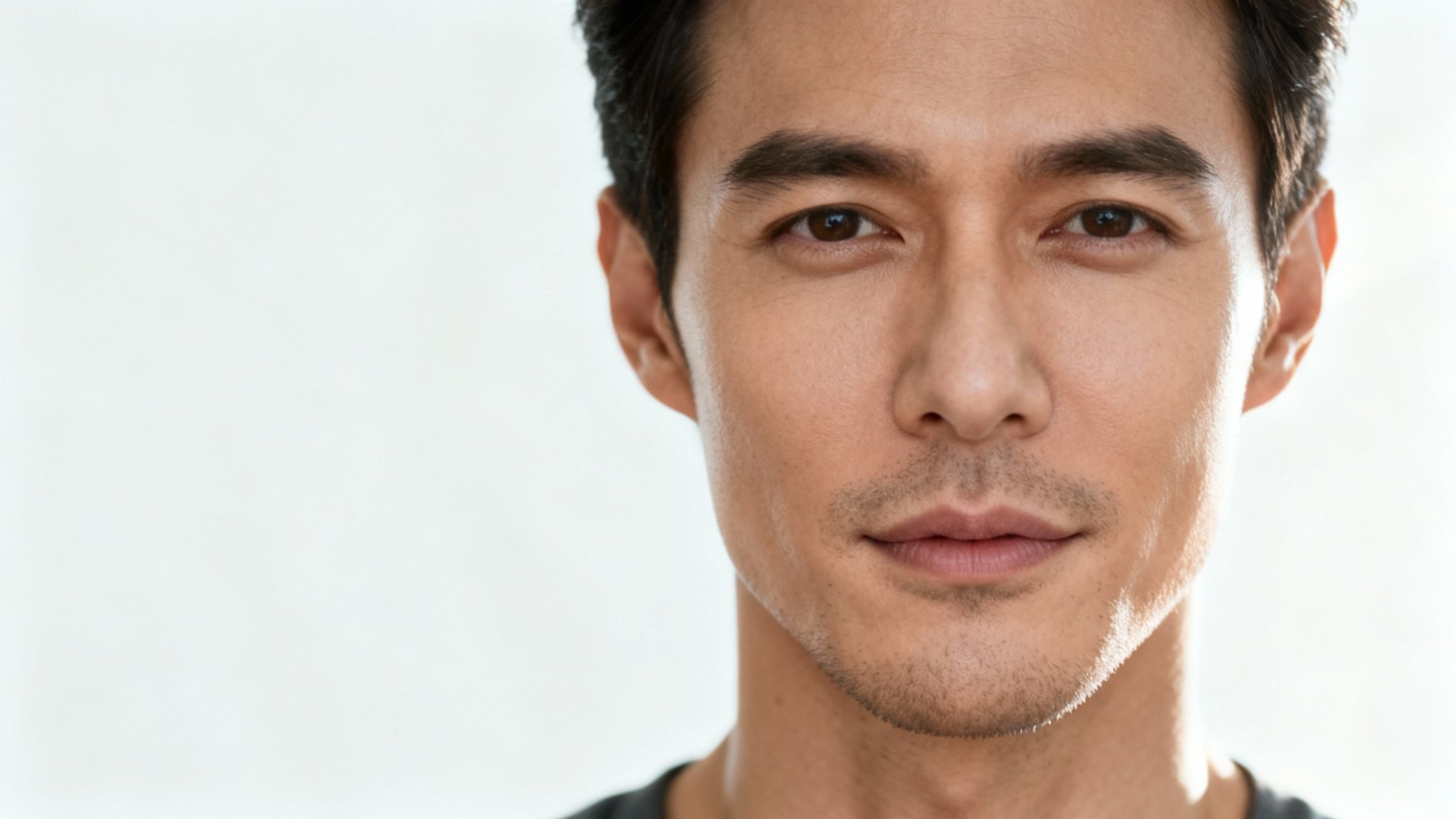
A high-resolution, front-facing portrait with clean, even lighting is non-negotiable. Submitting a photo with harsh shadows, oblique angles, or motion blur will confuse the algorithm, resulting in an artificial-looking output. Sharp, clear facial features are paramount.
Key Photo Selection Criteria
To optimize for success, the source photo must meet several key criteria. These are not mere suggestions but foundational requirements for a seamless, believable edit.
- Lighting is Everything: Opt for soft, natural light. Photographs taken facing a window or outdoors on an overcast day are ideal. Avoid harsh overhead lighting that casts deep shadows beneath the nose and chin, as this can severely disrupt the AI's ability to map the new facial hair correctly.
- Show Off That Jawline: The chin and jaw must be completely unobstructed. Any photograph where a hand rests on the chin or a high-collared shirt obscures the neck will likely produce a flawed edit. The AI requires an unimpeded view of its work area.
- Resolution Really Matters: A grainy, low-resolution image will yield a grainy, low-resolution beard. A sharp, detailed photograph is essential—a standard achievable by most modern smartphones. For those starting from scratch, a headshot photo generator can create a perfect, high-quality base image.
Expression and Angle
Facial expression is another crucial factor. A neutral expression or a subtle, closed-mouth smile provides a stable, undistorted canvas. A wide laugh or an open-mouthed grin can alter facial geometry, making it difficult for the AI to apply the beard naturally.
As veteran photographer Jeff Rojas advises in his book Photographing Men, "The most compelling portraits often have a quiet confidence. A neutral expression provides a timeless and versatile base." This principle is equally vital for AI editing.
Finally, adhere to a straight-on or slightly off-center angle. Extreme high or low angles distort facial proportions and almost guarantee a synthetic, "pasted-on" appearance. A well-composed, standard portrait provides the AI with the optimal data needed to generate a beard that appears native to the subject's face.
How to Write Prompts for the Perfect Beard
The text prompt is the primary interface with the AI—the creative blueprint that dictates the final outcome. Mastering this step is what distinguishes a visibly artificial edit from a hyper-realistic one that appears entirely authentic.
The process is analogous to commissioning a bespoke suit. A vague request like "I want a suit" is insufficient. A detailed specification—"I want a single-breasted, slim-fit navy wool suit with notched lapels"—provides the tailor with the necessary information. With AI, specificity is paramount.
From Simple to Specific: Building the Perfect Prompt
The most effective method for constructing a prompt is to start with a basic concept and iteratively add layers of detail. This approach, known as iterative prompting, yields superior control and prevents the AI from becoming confused by overly complex initial commands.
Begin with the fundamental style, then introduce descriptive adjectives to refine the result.
AI researcher Dr. Emily Carter notes, "Generative models respond best to a clear hierarchy of information. Start broad—the core concept—and then narrow down with specific modifiers. This guides the diffusion process more effectively toward the desired outcome."
Mastering Descriptive Adjectives
This is where true creative control is exercised. Moving beyond generic style names to use descriptive language that dictates texture, color, length, and grooming is the key to achieving professional-grade results. These adjectives function as fine-tuning controls.
- For Texture and Density: Employ terms like ‘thick,’ ‘wiry,’ ‘soft,’ ‘patchy,’ or ‘full’. A prompt for a "rugged, wiry lumberjack beard" will produce a vastly different result than one for a "soft, sparse beard."
- For Color and Shade: Avoid generic colors. Be precise. Use descriptors like ‘dark chocolate brown,’ ‘light auburn,’ ‘salt-and-pepper,’ or ‘jet black’. The more specific the color, the better the AI can match it to the subject's skin tone and existing hair.
- For Grooming Style: Describe its maintenance. Is it ‘neatly trimmed,’ ‘well-groomed,’ ‘unruly,’ ‘scruffy,’ or perhaps ‘faded on the cheeks’? These details instruct the AI on how to shape the beard's contours and overall form.
While this guide focuses on beards, these prompting principles are universally applicable. For modifying hair on the scalp, our guide on how to add hair to photos details similar techniques for achieving realistic outcomes.
Beard Style Prompt Library
To accelerate your learning curve, here is a quick-reference table of popular beard styles with prompts optimized for DreamShootAI.
| Beard Style | Example Prompt for DreamShootAI | Best For |
|---|---|---|
| Full Beard | "Add a thick, well-groomed full beard, dark brown" | A classic, masculine look. |
| Short Stubble | "Generate a light 5 o'clock shadow stubble" | A subtle, rugged enhancement. |
| Goatee | "Apply a clean, defined goatee with a connected mustache" | Framing the mouth and chin. |
| Van Dyke | "Add a classic Van Dyke beard, neatly trimmed" | A stylish, sophisticated look. |
| Lumberjack | "Create a thick, rugged, slightly unkempt lumberjack beard" | A bold and adventurous vibe. |
Use these prompts as a starting point. Modify the colors, textures, and grooming styles to precisely match your desired aesthetic.
Advanced Techniques for Seamless Realism
Generating a beard is merely the first stage. True mastery lies in achieving a result so natural that it eludes detection. This requires moving beyond basic prompts to address the subtle nuances that deceive the human eye—namely, lighting, texture, and blending.
The difference between a passable edit and a truly convincing one is found in these details. Even a subtle lighting mismatch can betray the edit. A study published in the Journal of Vision found that the human visual system is exceptionally sensitive to lighting inconsistencies in images, making it a primary cue for detecting digital manipulation. This makes matching the original light source absolutely critical for a believable result.
Mastering Light and Color Matching
This is the most critical element. If the lighting on the AI-generated beard contradicts the lighting in the source photo, the illusion shatters. A beard generated with a "studio lighting" prompt will appear incongruous if the original photo was captured outdoors on an overcast day. You must instruct the AI to replicate the exact lighting conditions.
The technique involves incorporating specific lighting descriptors into your prompt.
- For outdoor shots: Use phrases like "add a beard with soft, ambient lighting" for overcast conditions. For direct sun, specify the light source, such as "with direct, harsh sunlight from the right."
- For indoor shots: Match the color temperature with prompts like "in warm, indoor lighting" or "under cool fluorescent light."
As professional photographer Ian Kobylanski emphasizes, "The goal is to create images that feel as organic and authentic as possible." Your prompt’s lighting cues must perfectly mirror the reality of the original photo to maintain this authenticity.
This level of detail ensures that shadows and highlights on the generated beard fall naturally on the subject's face, preventing the tell-tale "pasted-on" effect.
Refining Edges and Blending
Another common indicator of an AI edit is an unnaturally sharp line where the beard meets the skin. Natural beards do not have hard edges; their hairlines, particularly on the cheeks, are softer and more diffuse.
You can instruct the AI to mimic this by adding phrases like "with a naturally faded cheek line" or "with soft, blended edges" to your prompt. This encourages the algorithm to create a gradual transition from skin to hair, which instantly enhances realism. For complex integrations, advanced AI subject replacement workflows offer the granular control needed to seamlessly blend new elements into an existing photograph.
Enhancing Texture with Upscaling
Finally, texture consistency is key. The resolution of the generated beard must match the rest of the image. If a tack-sharp source photo is combined with a slightly blurry or pixelated beard, the edit becomes immediately apparent. This can occur if the AI generates the feature at a lower resolution than the original image.
This is where a feature like DreamShootAI's Magic Upscaler is invaluable. After generating a satisfactory beard, process the image through the upscaler. This tool sharpens individual hair strands and increases the resolution to match the source photo perfectly. It is the final polish that renders the edit undetectable.
Troubleshooting Common Beard Generation Issues
Even the most advanced AI does not achieve perfection on every initial attempt. If your attempt to add a beard to a photo results in an output that appears slightly unnatural, you are not alone. The most frequent issues—such as artificial textures, mismatched colors, or a "pasted-on" appearance—are typically correctable with minor prompt adjustments.
Consider the AI a literal interpreter. Vague instructions compel it to make assumptions, which can lead to undesirable results. A successful edit hinges on providing clear, specific directives to guide the AI back on course.
For instance, if the generated beard seems disconnected from the face, the root cause is almost always a lighting mismatch. Refining your prompt to include specific commands like "with soft, ambient lighting from the left" can instantly resolve this by forcing the AI to align with the original photo's light source.
Solving Unnatural Textures and Mismatched Styles
When the AI produces an incorrect style or an unrealistic texture, the solution almost invariably lies in more descriptive language. The distinction between a believable beard and an artificial one often comes down to a few additional modifiers in your prompt.
- For Unnatural Texture: If the beard appears overly smooth or blurred, be more specific. Introduce texture-focused keywords like "wiry," "coarse," or "well-defined hairs." This instructs the AI to render fine detail rather than a smudged approximation.
- For the Wrong Style: If you requested stubble but received a full beard, be more assertive. Instead of "add stubble," try "generate very short 5 o'clock shadow stubble, not a beard."
- For Mismatched Colors: Do not simply request a "brown beard." Define the shade. Provide a reference. Prompts like "add a dark chocolate brown beard with flecks of grey" will produce a far more accurate color match.
This decision tree illustrates the two primary pathways to achieving a realistic synthetic beard.
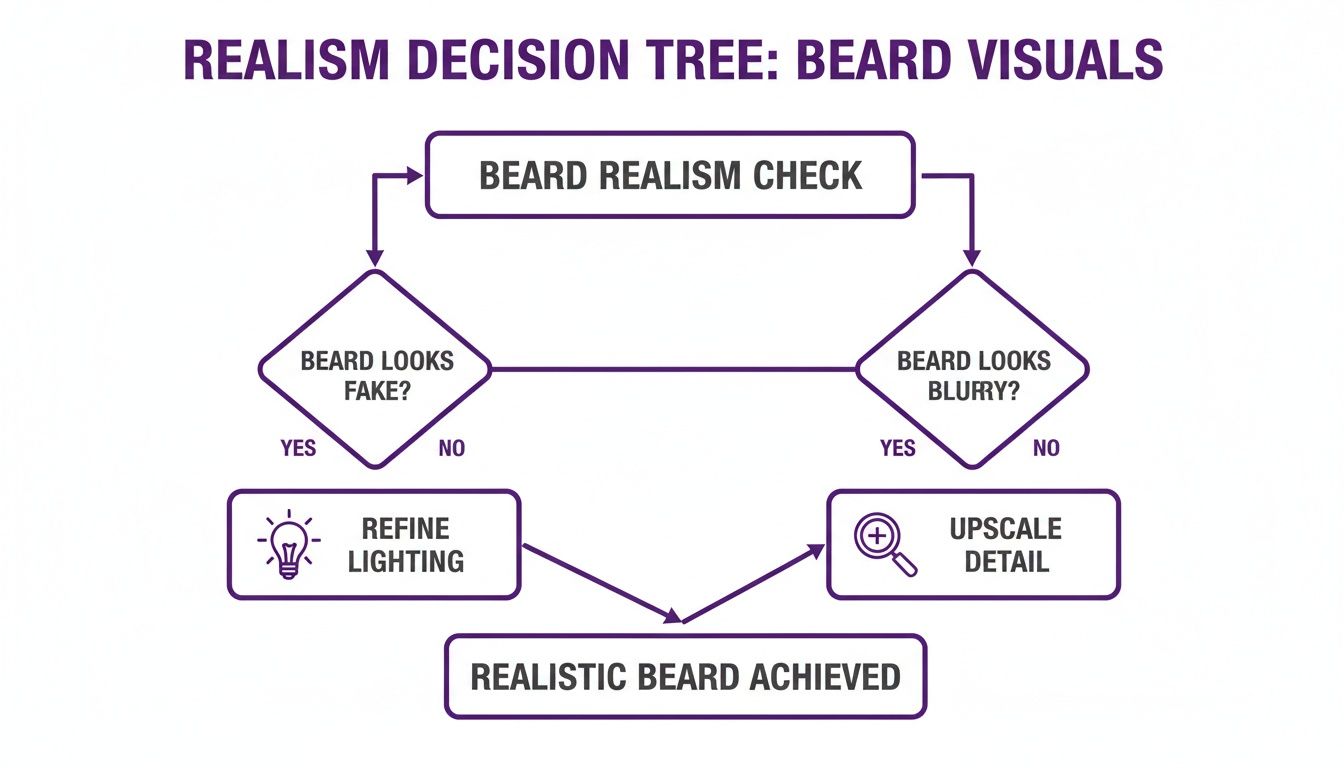
Ultimately, this demonstrates that correcting the lighting and increasing descriptive detail are the fundamental solutions for nearly any realism issue you will encounter.
Overcoming the 'Stuck-On' Look
The "floating beard" is a classic sign of poor integration, typically caused by overly sharp edges or a resolution mismatch between the generated feature and the source photo. Fortunately, this is another problem that can be solved through prompt engineering.
As digital imaging expert Ian Kobylanski notes, "The objective is always to create images that appear as organic and authentic as possible." Achieving this with AI requires guiding it to soften the transition between the new element and the original image.
To achieve that organic, blended appearance, try adding phrases like "with a naturally faded cheek line" or "with soft, blended edges where it meets the skin." This simple instruction encourages the AI to create a more gradual, realistic hairline. Combining this with a final pass through an upscaler to enhance detail will ensure your new beard appears as if it has always been there.
Got Questions About AI Beards? We Have Answers.
Venturing into AI photo editing can raise several questions, particularly when aiming to add a realistic beard to a photo. You need optimal results, efficiently. Let's address the most common inquiries.
A primary concern often revolves around control. Can AI truly generate specific, detailed beard styles, or is the user limited to generic outputs? The answer is an emphatic yes—the level of specificity is entirely up to you. The power of modern AI lies in its ability to interpret and execute detailed instructions. You are not confined to a one-size-fits-all solution; you can request virtually any style imaginable.
Can I Add a Specific Beard Style Like a Goatee or Stubble?
Absolutely. The purpose of a sophisticated AI editor like DreamShootAI is to facilitate granular control over the creative process. Discard generic prompts like "add beard" and adopt a more directive approach.
- For a goatee: Try a prompt such as, "add a clean, defined goatee connected to the mustache."
- For stubble: A directive like "generate a light 5 o'clock shadow stubble" will yield a subtle, rugged appearance.
- For a unique style: You could request a "stylish Van Dyke beard, neatly trimmed."
The more descriptive your prompt is regarding style, length, and color, the more impressive the final image will be.
Will the AI-Generated Beard Look Realistic on Any Photo?
Realism is fundamentally dependent on the quality of your source image. For optimal results, begin with a clear, high-resolution photograph where the subject's face is well-lit and oriented toward the camera. A high-quality input photo is arguably the single most important factor for a believable output.
Photos with deep shadows on the chin, harsh side lighting, or an obstructed jawline can confuse the AI, leading to the artificial, "pasted-on" look that immediately signals a digital edit. A 2018 study from UC Berkeley revealed that human observers can detect digital forgeries with surprising accuracy, often citing unnatural lighting and shadows as the primary giveaways.
As digital imaging authority Ian Kobylanski states, "The goal is to create images that appear as organic and authentic as possible." This process begins by providing the AI with a clean, authentic canvas.
How Can I Match the Beard Color to My Natural Hair?
Modern AI is quite adept at automatically matching hair color. However, for perfect consistency, you can easily direct the outcome by specifying the desired color in your prompt.
For example, a prompt like, "Add a thick, dark brown beard that matches his hair," leaves no ambiguity. You can also introduce nuance with prompts like, "Generate a full beard with flecks of salt-and-pepper grey." If the initial result is not perfect, simply refine the prompt with a more specific shade and regenerate.
Is It Possible to Edit the Beard After It Is Generated?
With prompt-based AI editors, "editing" is not a manual process involving brushes or layers, as in Photoshop. Instead, you refine the result by iterating on your instructions. If the first generated beard is too long, you adjust your prompt to "add a short, trimmed beard" and regenerate.
This iterative feedback loop allows you to fine-tune the output until it precisely matches your vision. Once satisfied, you can use integrated tools like an upscaler to enhance the final image's detail, ensuring the beard's texture and sharpness blend seamlessly with the original photograph.
Ready to experiment with your own photos? With DreamShootAI, you can add any beard style you can imagine in just seconds.
Written by Jocelyn Grey for the DreamShootAI blog.
Spotted something out of date? Tell us at [email protected] and we'll fix it.