Master Your Image: 10 Professional Photo Poses to Use in 2025
Discover 10 essential professional photo poses for stunning headshots. Learn expert tips and AI prompts to achieve a confident, polished look every time.
In a visually-driven professional landscape, your photograph is a primary tool for personal branding. It often serves as a first impression, shaping perceptions long before a handshake or conversation. Whether for a LinkedIn profile, a corporate website, or a speaking engagement, the right pose can instantly convey confidence, approachability, and authority. Mastering professional photo poses is not about vanity; it's about strategic communication.
Research from Princeton University psychologists revealed that viewers form lasting judgments about trustworthiness and competence in as little as 100 milliseconds based solely on a photograph. This split-second assessment highlights the critical importance of a pose that accurately communicates your intended message. As renowned portrait photographer Peter Hurley states, "It’s 90 percent on how you’re feeling and 10 percent on how you look... The confidence you exude is what sells the shot." The art and science of this lies in understanding how subtle shifts in posture can project powerful nonverbal cues. For a deeper dive into this subject, explore the specifics of creating trust-building professional images.
This comprehensive guide moves beyond generic advice, offering a curated roundup of the top 10 professional photo poses. We will dissect the psychology behind each stance, provide actionable execution notes, and show variations for different contexts. Furthermore, we will introduce how innovative AI tools like DreamShootAI can help you virtually perfect these poses from anywhere, ensuring your visual identity is as polished and impactful as your professional accomplishments. Let's get started.
1. The Power Stance
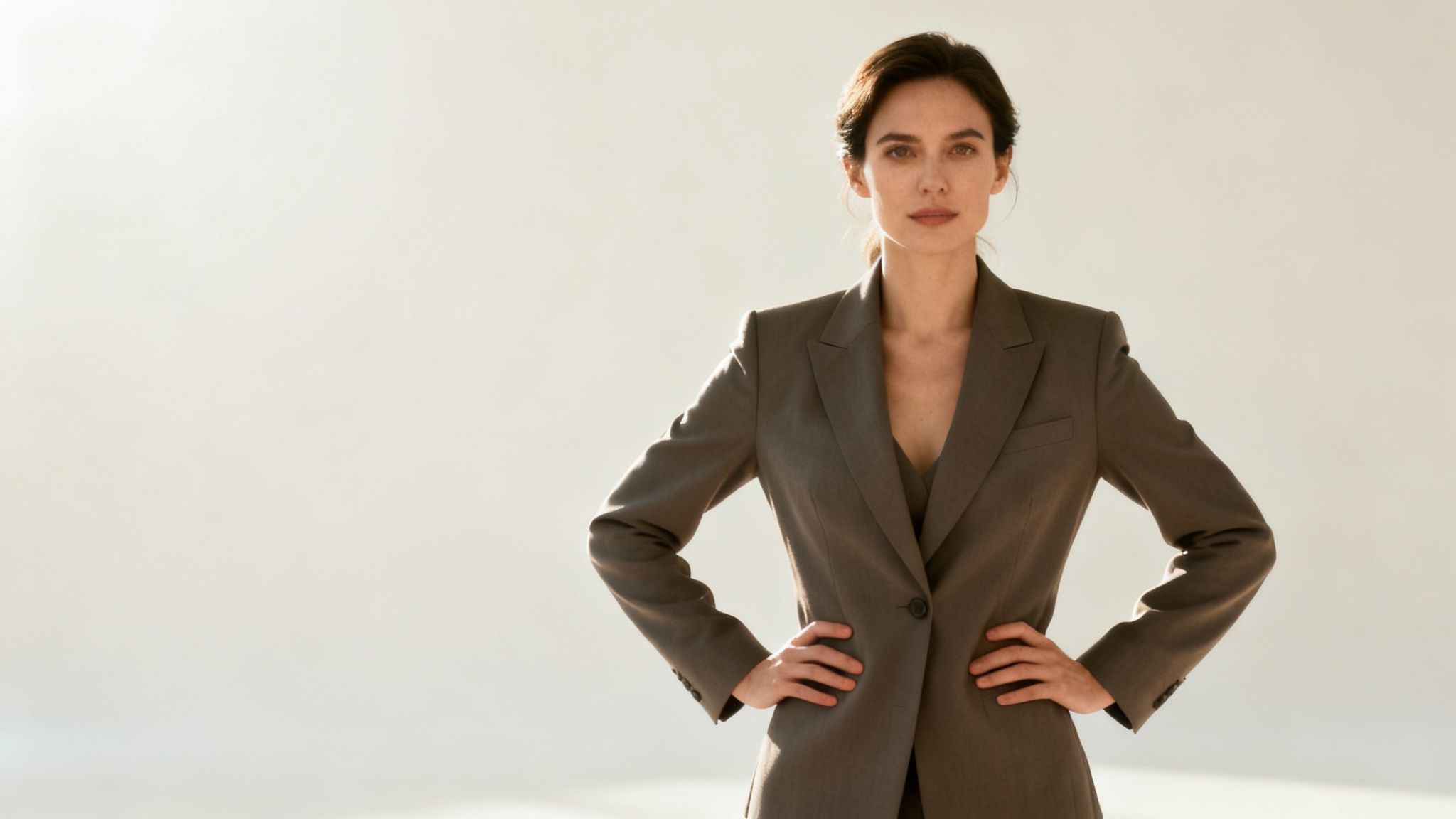
The Power Stance is a cornerstone of professional photo poses, designed to project an image of confidence, authority, and approachability. This pose involves a grounded posture: feet set shoulder-width apart, shoulders pulled back, and a straight, elongated spine. It is a non-verbal signal of leadership and self-assurance, making it an indispensable tool for corporate and personal branding photography.
The psychological impact of this pose is well-documented. Research led by social psychologist Amy Cuddy popularized the concept, suggesting that adopting "high-power" poses can influence hormonal levels, leading to increased feelings of confidence. This internal shift often translates externally, resulting in a more authentic and compelling photograph.
"Your body language shapes who you are."
- Amy Cuddy, Social Psychologist
When to Use The Power Stance
This pose is incredibly versatile but excels in specific contexts where authority and trust are paramount.
- Corporate Headshots: Ideal for executives, entrepreneurs, and team leads on LinkedIn or company websites.
- Political Campaigns: Conveys strength, stability, and leadership to voters.
- Personal Branding: Perfect for professionals like real estate agents, financial advisors, and consultants who need to build client trust instantly.
How to Execute The Power Stance
Achieving a natural yet powerful look requires attention to detail.
- Stance: Plant your feet firmly, about shoulder-width apart, with your weight balanced or slightly forward on the balls of your feet.
- Arms: Place hands on your hips or slide them into your pockets. Keep your elbows angled slightly back to create a defined waistline and avoid looking stiff.
- Posture: Roll your shoulders back and down, open your chest, and keep your chin level. Avoid puffing out your chest, which can appear aggressive rather than confident.
- Expression: Match the confident body language with a slight, genuine smile or a neutral, determined expression.
For those looking to capture this look without a professional studio, mastering the pose at home is entirely possible. You can explore detailed guides on taking professional headshots at home and learn how to perfect your setup and posture.
2. The Angled Three-Quarter Turn
The Angled Three-Quarter Turn is a fundamental and universally flattering technique in professional photo poses. It involves positioning the body at an approximate 45-degree angle to the camera while turning the head back toward the lens. This classic pose introduces dimension and depth, creating a more dynamic and less confrontational image than a straight-on shot. It naturally slims the silhouette, making it a go-to for photographers aiming to produce elegant and engaging portraits.
This pose is favored by portrait photographers because it adds a sense of shape and form to a two-dimensional medium. By turning the body, you create flattering lines and shadows that highlight the subject's features without the rigidity of a direct-to-camera stance. It strikes a perfect balance between being engaging and being relaxed.
"The three-quarter view is a staple in portraiture because it gives a sense of depth and form to the subject that a flat, frontal view often lacks."
- Peter Hurley, Headshot Photographer
When to Use The Angled Three-Quarter Turn
This pose's versatility makes it suitable for nearly any professional context, especially where a warm and competent image is desired.
- Corporate Headshots: Excellent for LinkedIn, company directories, and speaker bios, as it appears professional yet approachable.
- Actor Portfolios: A standard for headshots, showcasing facial features with added dimension and character.
- Medical and Legal Profiles: Conveys expertise and trustworthiness for professionals on their practice websites.
- Author Photos: Creates a thoughtful and engaging look for book jackets and promotional materials.
How to Execute The Angled Three-Quarter Turn
Mastering this pose is about subtle adjustments that make a significant impact on the final image.
- Stance: Stand with your feet angled about 45 degrees away from the camera. Place most of your weight on your back foot for a more relaxed posture.
- Shoulders: Keep your shoulders aligned with your feet at the same 45-degree angle. Allow the shoulder closer to the camera to drop slightly lower than the back one.
- Head Position: Gently turn your head back toward the camera until you are looking comfortably at the lens.
- Chin Angle: Keep your chin parallel to the ground or tilted slightly down. This helps define the jawline and avoid an unnatural upward angle.
- Expression: A gentle, confident smile or a pleasant, neutral expression complements this pose perfectly, making you appear open and engaging.
3. The Seated Executive
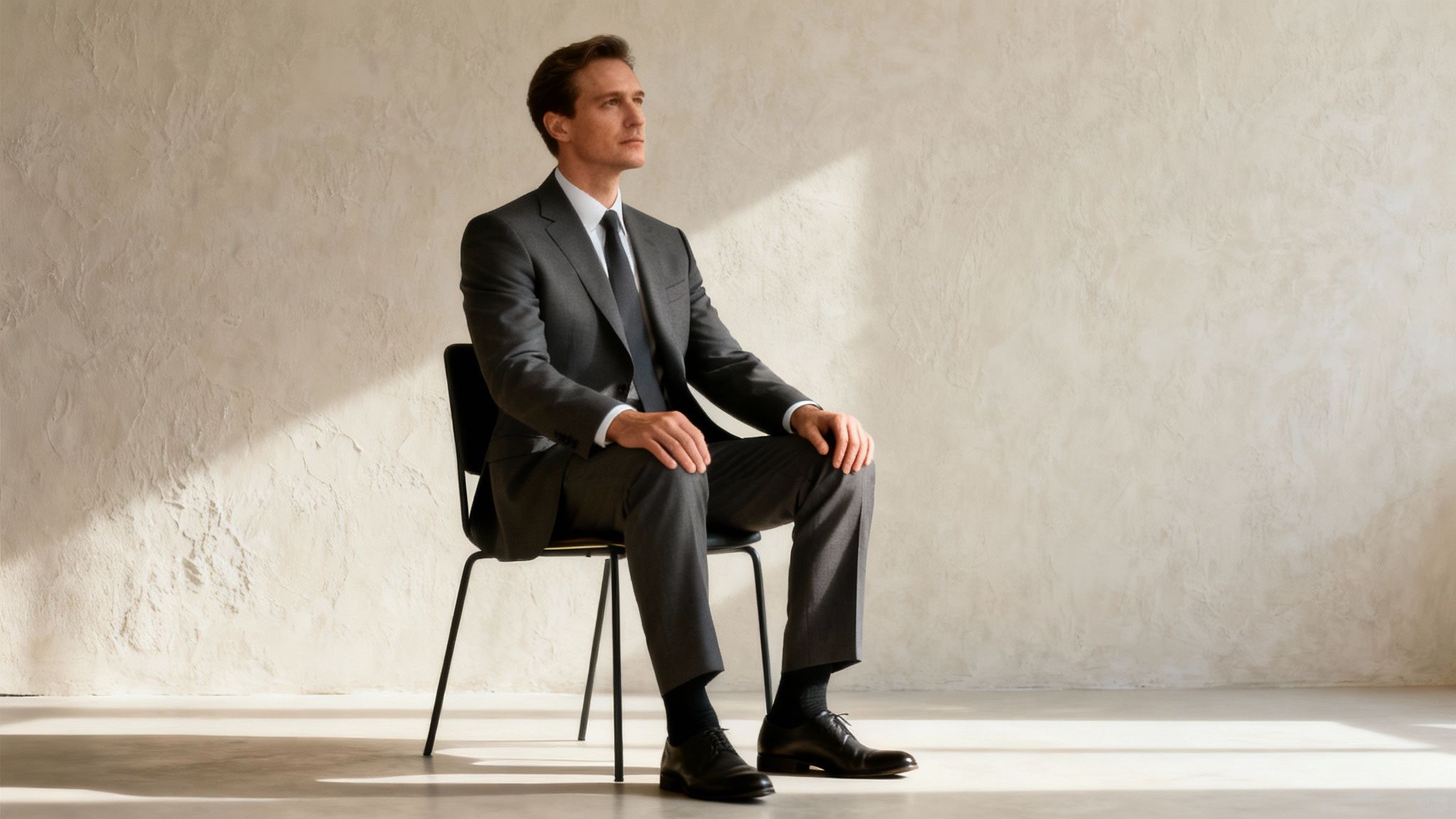
The Seated Executive is a refined pose that communicates authority, stability, and thoughtful leadership. By positioning the subject in a chair with purposeful posture, this pose creates a look that is both professional and approachable. It's a classic choice in corporate portraiture, shifting the focus from overt power to a more grounded and contemplative presence.
This pose leverages the environment and props, such as a well-chosen chair or desk, to build a narrative of influence and intellect. It moves away from confrontational stances and instead invites the viewer into a space of considered decision-making, making it a powerful tool for conveying seasoned expertise.
"A seated portrait can be incredibly powerful. It grounds the subject, allowing their confidence and personality to fill the frame without the distraction of a dynamic stance."
- Peter Hurley, Headshot Photographer
When to Use The Seated Executive
This pose is ideal for contexts where stability, wisdom, and professional gravitas are key messages.
- Corporate Leadership: Perfect for portraits of CEOs, board members, and senior management for annual reports or company websites.
- Legal and Academic Professionals: Favored by law firm partners, judges, and university deans to project intellect and authority.
- Publication Features: Commonly used for magazine interviews and author photos, conveying a sense of introspection and expertise.
How to Execute The Seated Executive
Achieving a polished seated pose requires careful attention to body language and composition.
- Posture: Sit towards the front edge of the chair to maintain a straight, engaged spine. Avoid slumping into the backrest.
- Positioning: Angle the chair slightly away from the camera to create a more dynamic composition. Lean your torso slightly forward to convey engagement and confidence.
- Legs: Keep feet flat on the floor to maintain a strong base. If crossing your legs, do so at the ankle or knee, as crossing high on the thigh can look less formal.
- Hands: Ensure hands are visible and purposefully placed. Rest them on your lap, the armrests, or gesture thoughtfully to add to the narrative.
4. The Shoulder Lean
The Shoulder Lean introduces a casual, modern dynamic to professional photo poses, effectively balancing approachability with polished confidence. By having the subject lean their shoulder against a solid surface like a wall or doorway, the pose breaks from traditional, formal stances. It projects a sense of ease and openness, making it ideal for contemporary corporate cultures and creative industries.
This pose is particularly effective because it softens body language, which can make the subject appear more relatable and less intimidating. According to a 2018 study in the Journal of Nonverbal Behavior, postures perceived as "open" are consistently linked to higher ratings of likability and trustworthiness. The slight angle created by the lean adds visual interest and a subtle sense of movement, preventing the portrait from looking static.
"A simple lean can transform a stiff portrait into an engaging one. It’s an invitation, a sign of comfort in one’s own skin and environment."
- Jaleel King, Corporate Photographer
When to Use The Shoulder Lean
This pose excels in environments that value innovation, creativity, and a modern, personable approach.
- Tech and Startup Headshots: Perfect for conveying a relaxed, forward-thinking company culture on team pages and LinkedIn profiles.
- Creative Professionals: An excellent choice for designers, marketers, and artists who want their portraits to reflect their creative and approachable nature.
- "About Us" Pages: Ideal for creating a cohesive and friendly look for company-wide photos, suggesting a supportive and collaborative team.
How to Execute The Shoulder Lean
Mastering this pose is about creating a look that is both relaxed and intentional.
- Stance: Lean your shoulder firmly but gently against a wall. Position your front foot slightly forward to create a natural and stable base.
- Posture: Keep your chest open and shoulders relaxed, avoiding a slump. The lean should be genuine; use the wall for actual support to make it look authentic.
- Arms: Let your arms hang naturally. You can cross them loosely, place one hand in a pocket, or hold a prop like a tablet or notebook to add context.
- Head Position: Maintain a level chin, keeping it parallel to the ground despite the angle of your body. Look directly at the camera or slightly off-camera for a more candid feel.
- Expression: A warm, genuine smile or a pleasant, neutral expression works best to complement the relaxed nature of the pose.
5. The Desk-Engaged Pose
The Desk-Engaged Pose places the subject in their natural work environment, creating a narrative of expertise, dedication, and authenticity. This pose involves being photographed at a workspace, either sitting at a desk interacting with work materials or leaning forward with hands engaged. It contextualizes the professional, making the resulting image more relatable and illustrative of their role.

This "in-action" approach moves beyond a traditional static headshot, telling a story about the individual's professional life. It adds a layer of credibility by showcasing the person within their element. When executed well, it conveys competence and engagement without appearing staged or overly formal.
"A photograph of a person at their desk isn't just a portrait; it's a visual biography of their professional identity."
- David Hobby, Photojournalist
When to Use The Desk-Engaged Pose
This contextual pose is highly effective for roles where process, environment, and daily work are central to the professional brand.
- Corporate Website 'About Us' Pages: Humanizes team members by showing them in their actual workspace.
- Business Publications: Provides editorial context for articles featuring executives, entrepreneurs, or specialists.
- LinkedIn Content: Ideal for posts detailing a project, sharing industry insights, or showcasing company culture.
- Company Annual Reports: Illustrates the active, dedicated workforce behind the company's success.
How to Execute The Desk-Engaged Pose
A successful desk pose looks natural and focused, requiring careful arrangement of the scene and subject.
- Workspace: Declutter the desk, leaving only items relevant to the professional's story (e.g., a specific tool, a notebook, a laptop).
- Positioning: Sit or stand at the desk, leaning slightly forward to convey engagement. Angle your body about 45 degrees toward the camera.
- Hands: Engage your hands naturally with an object. This could be typing on a keyboard, holding a pen, or resting on a book.
- Lighting: Use soft, natural light from a window if possible to avoid harsh overhead lighting. The light should illuminate your face.
- Expression: Aim for a focused, pleasant expression. A slight, thoughtful smile often works best.
Getting the lighting and composition right is key. You can explore guides on how to make photos look professional to master these essential elements.
6. The Standing Conversation Pose
The Standing Conversation Pose captures the dynamic and collaborative spirit of a team. Unlike static group shots, this pose arranges two or more professionals in a natural, conversational cluster, suggesting interaction, cohesion, and a positive company culture. It’s an effective visual storytelling tool that humanizes a brand and showcases teamwork in action.
This approach moves beyond traditional, rigid group portraits to reflect a more modern and accessible corporate environment. Research from a LinkedIn study found that profiles with photos receive up to 21 times more views. By showcasing a team in a relatable, interactive setting, companies can significantly boost their brand's appeal and perceived authenticity.
"A great team photo isn’t just about getting everyone in the frame; it’s about capturing the energy and connection that makes the team work."
- Peter Hurley, Headshot Photographer
When to Use The Standing Conversation Pose
This pose is ideal for communicating collaboration and approachability, making it a perfect fit for specific professional contexts.
- Corporate Team Photos: Excellent for "About Us" pages, recruitment materials, and internal communications to highlight a collaborative culture.
- Partnership Portraits: Conveys a sense of synergy and mutual respect between business partners or leadership teams.
- Company Culture Showcases: Perfect for social media and branding campaigns aimed at attracting top talent and connecting with clients on a human level.
How to Execute The Standing Conversation Pose
Creating a genuine sense of interaction is key to making this professional photo pose successful.
- Arrangement: Position subjects in a loose, staggered formation rather than a straight line. Have them stand at slight 45-degree angles to each other and the camera to create depth.
- Interaction: Encourage genuine conversation about a light-hearted topic to elicit natural expressions and gestures. The goal is to capture authentic moments of engagement.
- Positioning: Stagger individuals to create layers, placing taller people slightly behind shorter ones. Leave a small, natural space between subjects to avoid looking crowded.
- Posture: Body language should be relaxed. Encourage varied arm positions, such as one person with hands in pockets while another gestures naturally, to add visual interest and authenticity.
7. The Hands-in-Pockets Casual
The Hands-in-Pockets Casual pose strikes a perfect balance between professional polish and modern relatability. By placing one or both hands in their pockets, the subject projects a sense of ease and confidence that feels authentic and unforced. This pose dismantles the stiffness often associated with traditional corporate photography, signaling accessibility and a contemporary mindset.
This pose's effectiveness lies in its ability to humanize the subject. It’s a common, natural gesture that conveys comfort and self-assurance without appearing staged. In a professional context, it suggests that the individual is confident in their skills and approachable as a colleague or leader. This subtlety is key to its appeal in today's less formal business environments.
"A relaxed hand in a pocket can make a professional portrait feel less like a stuffy headshot and more like a genuine interaction."
- Peter Hurley, Headshot Photographer
When to Use The Hands-in-Pockets Casual
This pose is ideal for professionals and brands aiming for a modern, approachable image. It's particularly effective in contexts that value collaboration and innovation.
- Tech and Startup Profiles: Perfectly captures the innovative, relaxed culture of the tech industry for websites and LinkedIn.
- Creative Professionals: Artists, designers, and marketers can use this pose to appear confident and creative.
- "About Us" Pages: Great for team photos to showcase a friendly and collaborative company culture.
- Personal Branding: Excellent for consultants and freelancers who want to appear knowledgeable yet easy to work with.
How to Execute The Hands-in-Pockets Casual
The goal is to look relaxed, not sloppy. Attention to small details makes all the difference in this professional photo pose.
- Hand Placement: The "thumb out" technique is classic. Place your four fingers in the pocket while leaving the thumb visible along the seam. This creates a more dynamic line and prevents hands from disappearing entirely.
- Posture: Maintain a strong posture. Keep your chest open and shoulders back to avoid slouching, which can undermine the confident feel.
- Symmetry: Asymmetry often looks more natural. Try placing just one hand in a pocket and letting the other arm hang naturally or gesture.
- Clothing: This pose works best with well-fitted trousers or jackets. Your choice of outfit is crucial; poorly fitting clothes can bunch up and ruin the shot. You can get guidance on what to wear for headshots to ensure your clothing complements the pose perfectly.
8. The Over-the-Shoulder Angle
The Over-the-Shoulder Angle is a classic and sophisticated pose that creates a sense of elegance, intrigue, and approachability. This professional photo pose involves the subject standing mostly turned away from the camera, then looking back over their shoulder. The result is a dynamic composition that highlights the jawline, neck, and shoulders, adding a layer of depth and personality often missing from more direct headshots.
This pose subtly breaks the fourth wall, creating a "caught-in-the-moment" feeling that is both engaging and disarming. It suggests the subject is looking back to connect with the viewer, which can make the portrait feel more personal and less staged. This technique is a favorite among portrait and fashion photographers for its flattering lines and narrative potential.
"Turning the body away from the camera and looking back over the shoulder is a simple way to create beautiful, flowing lines and an engaging portrait."
- Sue Bryce, Portrait Photographer
When to Use The Over-the-Shoulder Angle
This pose is highly effective for portraits that need to convey both professionalism and a touch of creative flair.
- Creative Professionals: Ideal for actors, artists, designers, and writers who want to project an accessible yet thoughtful persona.
- High-End Corporate Portraits: Offers a modern, fashion-forward alternative for executives and entrepreneurs on websites or in magazine features.
- LinkedIn Profile Pictures: Helps a profile stand out with a dynamic and approachable image that still feels polished and professional.
How to Execute The Over-the-Shoulder Angle
Mastering this pose is about creating a natural turn, not an uncomfortable twist.
- Stance: Start with your body angled about three-quarters away from the camera.
- Turn: Instruct the subject to turn their head back toward the lens. The movement should originate from the upper torso and shoulders, not just the neck, to avoid strain.
- Posture: Keep the shoulders relaxed and rolled back. One shoulder will be closer to the camera; ensure it doesn't hunch up toward the ear.
- Chin and Jawline: Position the chin slightly down and forward. This simple adjustment helps define the jawline and prevents the appearance of a double chin.
- Expression: A soft smile or a relaxed, thoughtful expression works best. The glance should feel natural and inviting, not forced.
By combining a strong posture with a gentle turn, you can achieve a professional photo pose that is both timeless and captivating.
9. The Hands-Crossed Arms Pose
The Hands-Crossed Arms Pose is a classic in professional photography, often used to project an image of confidence, authority, and self-containment. When executed correctly, crossing the arms across the chest creates a powerful and assertive look. It's a pose that signifies control and expertise, making it a go-to for individuals in leadership or specialized fields. The key is to avoid appearing defensive or closed-off, which requires careful attention to the rest of the body language.
This pose must be balanced with approachable facial cues to be effective. While the crossed arms suggest seriousness, a warm expression ensures the subject appears confident rather than unapproachable. This subtle combination is what transforms the pose from a defensive gesture into a statement of professional credibility.
"A common mistake is crossing the arms too tightly, which can signal insecurity. A loose, relaxed cross paired with an open posture communicates confidence and control."
- Peter Hurley, Headshot Photographer
When to Use The Hands-Crossed Arms Pose
This pose is particularly effective in contexts where authority and expertise need to be clearly communicated.
- Executive Portraits: Ideal for CEOs, directors, and managers on company websites or in annual reports to convey leadership.
- Academic and Expert Profiles: Perfect for professors, authors, and industry specialists who want to appear knowledgeable and credible.
- Creative Professionals: Artists, designers, and architects can use a more relaxed version to look thoughtful and confident in their craft.
- LinkedIn Headshots: Helps professionals in competitive fields stand out with an image of focused determination.
How to Execute The Hands-Crossed Arms Pose
Mastering this pose is about balancing power with approachability.
- Posture: Stand tall with your shoulders pulled back and down. An open chest is crucial to prevent the pose from looking defensive.
- Arms: Cross your arms loosely over your chest. Avoid gripping your biceps tightly; let your hands rest gently on the opposite arms. A slight gap between your arms and your body can create a more flattering silhouette.
- Shoulders: Keep your shoulders relaxed and level. Tense or hunched shoulders are a clear sign of discomfort and will undermine the pose's intended effect.
- Expression: This is the most critical element. Pair the pose with a genuine smile or a confident, neutral expression. Direct eye contact with the camera connects with the viewer and projects self-assurance.
10. The Dynamic Walking or Forward Movement Pose
Breaking away from static portraits, the Dynamic Walking Pose captures the subject in motion, typically striding towards the camera. This modern approach injects energy, momentum, and a sense of forward-thinking purpose into a professional image. It communicates ambition and progressiveness, making it a powerful choice for individuals and brands focused on innovation and growth.
This pose is more than just a candid shot; it's a carefully orchestrated action that tells a story of a professional on the move. The perceived movement creates a dynamic visual narrative that resonates strongly in industries defined by constant change and advancement, such as technology and entrepreneurship. It suggests a proactive and goal-oriented personality.
"Action shots, like walking, bring a sense of life and authenticity to a portrait. It breaks the mold of the stiff, traditional headshot and shows a person in their element, moving forward."
- Peter Hurley, Headshot Photographer
When to Use The Dynamic Walking Pose
This energetic pose is particularly effective in contexts that benefit from a sense of drive and modernity.
- Startup and Tech Profiles: Perfectly captures the innovative and fast-paced culture of startups and technology companies for "About Us" pages or press kits.
- Entrepreneurial Branding: Ideal for founders and business owners who want to project an image of ambition, vision, and active leadership.
- LinkedIn Banners and Website Photos: Creates a compelling and engaging visual that stands out from standard headshots, suggesting proactivity and forward momentum.
How to Execute The Dynamic Walking Pose
Capturing motion effectively requires a blend of natural movement and technical precision.
- Movement: Walk towards the camera at a slow, controlled, and natural pace. Let your arms swing gently as they would normally.
- Focus: The photographer should use a continuous autofocus mode (like AI-Servo on Canon or AF-C on Nikon) to keep you sharp as you move. A fast shutter speed (1/500s or faster) is crucial to freeze the motion without blur.
- Angle: Shooting from a slightly lower angle can add a sense of importance and power to your stride, enhancing the professional look.
- Expression: Maintain a confident and approachable expression. A slight smile or a focused, determined look can complement the sense of purpose.
Mastering the technical aspects of this pose can be challenging. The video below offers practical tips on capturing sharp, compelling walking shots.
Top 10 Professional Photo Poses — Comparison
| Pose | 🔄 Implementation complexity | ⚡ Resource requirements | ⭐ Expected outcomes | 📊 Ideal use cases | 💡 Key advantages / tips |
|---|---|---|---|---|---|
| The Power Stance | Low–Moderate — simple to teach, watch shoulder tension | Minimal — neutral background or studio | ⭐⭐⭐⭐ — authoritative, confident look | Executive portraits, LinkedIn, political headshots | 💡 Projects competence; keep arms ~45° and avoid rigid shoulders |
| The Angled Three-Quarter Turn | Moderate — requires precise angles and lighting | Minimal–Moderate — controlled lighting helpful | ⭐⭐⭐⭐⭐ — most flattering, adds depth and slimming | Headshots for actors, executives, professional bios | 💡 Universally flattering; weight on back foot and drop front shoulder slightly |
| The Seated Executive | Moderate — posture and furniture positioning matter | Moderate — appropriate chair and composed setting | ⭐⭐⭐⭐ — stable, approachable authority | Board members, legal and academic portraits, features | 💡 Sit toward front of chair, feet flat to avoid slouching |
| The Shoulder Lean | Low–Moderate — requires genuine lean and balance | Minimal — wall or structure and simple backdrop | ⭐⭐⭐ — relaxed, approachable professionalism | Tech, startups, creative agencies, modern teams | 💡 Use real support, keep chin parallel and chest open |
| The Desk-Engaged Pose | Moderate–High — environment control and direction needed | Moderate — tidy workspace, good natural or window light | ⭐⭐⭐⭐ — authentic, relatable contextual portraits | Company culture, marketing, annual reports, LinkedIn | 💡 Clean desk, show hands engaged, use side window light |
| Standing Conversation Pose | High — multi-subject coordination and direction | Moderate–High — space, lighting for group, staging | ⭐⭐⭐⭐ — dynamic, collaborative, engaging | Team photos, partnership portraits, culture spreads | 💡 Stagger heights, angle toward each other, encourage real interaction |
| Hands-in-Pockets Casual | Low — easy for subjects to adopt naturally | Minimal — basic background or studio | ⭐⭐⭐ — approachable, confident casual look | Startups, founders, creative professionals, tech | 💡 Show thumbs lightly outside pockets; avoid deep pushing |
| Over-the-Shoulder Angle | Moderate — requires neck/shoulder alignment and lighting | Minimal–Moderate — controlled lighting to flatter neck/jaw | ⭐⭐⭐⭐ — elegant, dimensional, highlights posture | High-end headshots, fashion-forward corporate portraits | 💡 Rotate shoulders, not just neck; lower chin slightly for jawline |
| Hands-Crossed Arms Pose | Low–Moderate — watch for defensive appearance | Minimal — studio or simple backdrop | ⭐⭐⭐ — framed, confident, solves hand placement | Executive portraits, expert profiles, leadership photos | 💡 Keep shoulders relaxed, leave slight gap for definition |
| Dynamic Walking / Forward Movement | High — timing, focus, and space required | High — open space, fast shutter, continuous AF | ⭐⭐⭐⭐ — energetic, forward-thinking, modern vibe | Entrepreneurs, innovation brands, lifestyle corporate imagery | 💡 Use fast shutter/continuous AF and controlled slow walks for natural motion |
Bringing It All Together: Your Blueprint for Professional Presence
The journey through these ten foundational professional photo poses reveals a powerful truth: your body language is a critical component of your personal brand. From the confident assertion of "The Power Stance" to the approachable authority of "The Seated Executive," each pose is a tool for non-verbal communication. Mastering these isn't about memorizing positions; it's about building a vocabulary to articulate your professional identity visually.
Renowned headshot photographer Peter Hurley famously says, "It's 90% you and 10% me." This encapsulates the core takeaway of our guide. While a photographer’s skill is crucial, the confidence, authority, and authenticity projected in a final image originate with the subject. Your understanding of how to angle your body, position your hands, and adjust your expression gives you direct control over the narrative your professional photos tell.
From Knowledge to Actionable Strategy
Moving forward, the goal is to internalize these concepts so they become second nature. Think of this list not as a rigid set of rules, but as a flexible blueprint. A study published in Social Psychological and Personality Science found that adopting "power poses" can lead to increased feelings of confidence and power. This psychological boost is as important as the visual result.
Your next steps should focus on personalization and practical application:
- Practice with Purpose: Stand in front of a mirror and cycle through the poses. Notice which ones feel most natural and aligned with your personality. Is the "Hands-in-Pockets Casual" a better fit for your relaxed brand, or does the "Hands-Crossed Arms Pose" convey the focused expertise you want to project?
- Context is Key: Revisit the poses with specific goals in mind. A dynamic walking shot might be perfect for an "About Us" page, while the classic "Angled Three-Quarter Turn" remains the gold standard for a LinkedIn profile picture.
- Refine Your Environment: A powerful pose can be undermined by a distracting background. To achieve a polished, distraction-free image that focuses solely on you, consider leveraging tools for AI background removal, ensuring the setting complements your professional message.
The Modern Fusion: Posing Knowledge and AI Innovation
The digital landscape has introduced a revolutionary way to apply this knowledge. Platforms like DreamShootAI are democratizing professional photography by placing the power of a photo studio directly in your hands. By creating a digital clone of yourself, you can endlessly experiment with every pose detailed in this article.
This technological leap removes the traditional barriers of time, cost, and studio anxiety. You can virtually try on different professional outfits, test poses against various corporate backdrops, and generate an entire portfolio of headshots without a single click of a physical camera. This fusion of classic posing wisdom with cutting-edge AI empowers you to meticulously craft and control your professional image with unprecedented precision. The poses are your language; technology is now your platform for broadcasting that message to the world, ensuring your visual presence is as compelling and expert as your professional skills.
Ready to take complete control of your professional image? With DreamShootAI, you can apply these poses to your own digital clone, generating flawless, studio-quality headshots and professional photos in minutes. Stop wishing for the perfect photo and start creating it at DreamShootAI today.
Written by Jocelyn Grey for the DreamShootAI blog.
Spotted something out of date? Tell us at [email protected] and we'll fix it.