How to Create AI Videos: A Practical Guide for Beginners
Learn how to create AI videos from scratch. This practical guide covers everything from concept and prompting to using AI video tools for amazing results.
Creating an AI video involves leveraging specialized online tools to transform text or still images into dynamic, moving clips. The process typically begins with selecting an AI video generator, training a digital "clone" of an individual using a series of photos, and then crafting descriptive prompts to direct the AI's output in terms of action, style, and setting. This technology represents a paradigm shift in content production, moving the focus from technical cinematography to creative direction.
The New Era of AI Video Creation
We have officially entered a revolutionary phase where video production is no longer the exclusive domain of studios with substantial budgets and sophisticated equipment. The advent of generative AI video tools has fundamentally altered the content creation landscape. According to a 2023 report by Synthesia, 73% of companies using AI video report a positive ROI, underscoring its tangible business impact. The paradigm has shifted from cinematography to directorship, from operating a camera to commanding an algorithm.
This democratization of video is a monumental advantage for marketers, small business owners, and solo creators. It provides the capability to produce high-quality video content with unprecedented speed and cost-efficiency. This is not a fleeting technological trend; it is a fundamental movement making visual storytelling universally accessible. The core principle is as simple as it is powerful: you provide the conceptual framework through text, and the AI materializes it into a dynamic, visual narrative. As technologist and investor Elad Gil states, "Generative AI is a step function change in the ability to create."
A Market on a Steep Climb
The excitement surrounding AI video is substantiated by formidable market growth. What began as niche academic projects has rapidly evolved into a major commercial industry. According to analysis from MarketsandMarkets, the generative video AI market was valued at $0.6 billion in 2023 and is projected to skyrocket to $2.1 billion by 2028, growing at a staggering compound annual growth rate (CAGR) of 28.7%. These figures do not merely indicate growth; they illustrate a technology accelerating at a dizzying pace.
This explosive expansion is fueled by an insatiable demand for efficient, scalable content across various sectors. Businesses are leveraging AI video for:
- Personalized Marketing: Creating bespoke ad campaigns that can be scaled effortlessly.
- Corporate Training: Developing engaging and consistent educational materials.
- Social Content: Meeting the relentless demand for fresh video content to maintain audience engagement.
Why This Should Matter to You
Mastering how to create AI videos provides a significant competitive advantage. It enables the rapid testing of creative concepts without major financial investment, the maintenance of a consistent content pipeline, and the visualization of complex ideas without the need for a physical film crew.
This guide is engineered to provide the clear, step-by-step instructions required to achieve proficiency. For a deeper technical dive, consult this ultimate guide to AI powered video creation.
"Character consistency is difficult...The prevailing advice is to use the exact same descriptions in each prompt, but that only gets you so far. I haven't yet tried extremely detailed descriptions, but surprisingly I see people...report getting consistency with pretty vague descriptions. I think generating many times is probably the key."
— David Kadavy, Author and Podcaster
From here, we will deconstruct the practical steps—from preparing your source imagery to applying the final polish. Our guide on the DreamShootAI AI video generator can offer more specific insights into tools you can begin using immediately. This journey begins with a crucial shift in mindset: your imagination is now your most vital piece of production equipment.
Laying the Groundwork for Your AI Video
Before engaging with any generative AI, it is imperative to understand that its output is wholly dependent on the quality of its input. Even the most advanced AI is rendered ineffective without the right foundational elements. Neglecting this preparatory phase is the primary reason many AI videos fail, resulting in inconsistent, visually jarring, and ultimately unusable content.
The process does not begin with code or prompts; it begins with a clear, well-defined concept. What is the narrative? Who is the subject? What is the intended tone? The transition from an amorphous idea like "a cool marketing video" to a concrete plan such as "a 15-second clip of a confident professional discussing quarterly growth in a modern office" is the first critical step toward success.
Conceptualizing Your Video
First, a blueprint is required. While a full-scale script may be unnecessary, you must document the core elements that will guide every subsequent decision, from photo selection to prompt composition.
This foundational plan should address several key questions:
- The Subject: Who is the focal point? Are you creating a digital clone of yourself, inventing a character, or animating a product?
- The Action: What is the subject doing? Speaking to the camera, traversing a room, or interacting with an object?
- The Setting: Where does the action take place? A sunlit park, a sleek futuristic cityscape, a cozy coffee shop?
- The Tone: What is the desired emotional resonance? Professional and authoritative, lighthearted and engaging, or cinematic and dramatic?
Establishing these parameters from the outset prevents the inefficient cycle of generating, rejecting, and restarting. It provides creative guardrails, transforming a daunting blank canvas into a structured, manageable project.
Selecting and Preparing Your Visual Assets
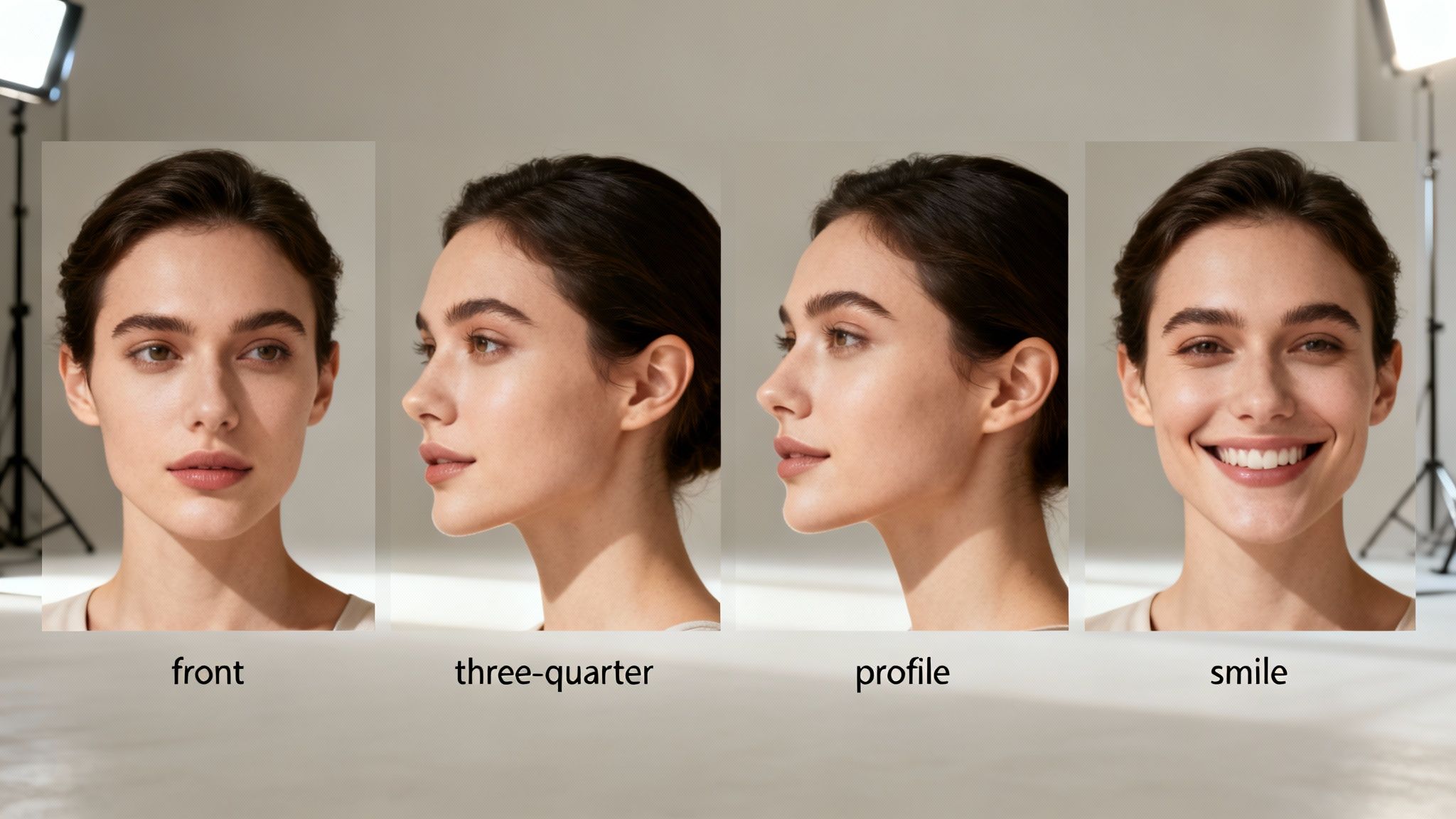
This is the most critical stage. The quality of your source photographs is the single most important input for creating a believable AI character. The AI model learns a person's facial geometry, expressions, and response to light from these images. Providing a low-quality, inconsistent set of photos is analogous to giving a sculptor a block of flawed marble—the final product will inevitably reflect these imperfections.
High-quality, varied images are not merely a "nice-to-have"; they are a technical prerequisite for achieving character consistency, arguably the most challenging aspect of AI video generation.
Author and creator David Kadavy, who has extensive experience in this domain, notes, "Character consistency is difficult... The prevailing advice is to use the exact same descriptions in each prompt, but that only gets you so far... I think generating many times is probably the key."
While Kadavy is correct that iteration is essential, beginning with an exemplary set of photos drastically reduces the required trial-and-error. The AI needs to construct a 3D understanding of the face, a task it can only accomplish with a diverse set of 2D images.
To execute this correctly, you must be rigorous in your photo selection. Treat each image as a critical piece of data being fed into the machine.
Here is a checklist to ensure your source photos meet the necessary standards.
Photo Input Quality Checklist for Optimal AI Clone Creation
This table serves as your quick-reference guide for selecting appropriate photos. Mastery of this step is the secret to creating a consistent, high-fidelity AI avatar that accurately represents the intended individual.
| Attribute | Best Practice | Why It Matters |
|---|---|---|
| Quantity | 10-20 high-quality photos | This provides the AI with sufficient data to learn the face from multiple perspectives without being overwhelmed by excessive information. |
| Variety of Angles | Include front-facing, three-quarter views, and side profiles. | Absolutely critical for building a 3D model of the face, which allows for realistic head turns and movements in the video. |
| Lighting | Use clear, consistent, and even lighting. Avoid harsh shadows or dramatic backlighting. | The AI can misinterpret strong shadows as permanent facial features (e.g., scars or wrinkles), leading to bizarre visual artifacts. |
| Resolution | Minimum 1024x1024 pixels. Higher is always better. | More pixels mean more detail. The AI can capture subtle textures and facial nuances with much greater accuracy. |
| Facial Expressions | Provide a mix of neutral expressions and gentle smiles. Avoid exaggerated emotions. | This gives the AI a natural baseline and a subtle emotional range, preventing the character from appearing static or cartoonishly over-animated. |
| Obstructions | Ensure the face is completely clear. No sunglasses, hats, or hands blocking any features. | The AI requires an unobstructed view of key facial landmarks—eyes, nose, mouth—to construct an accurate digital double. |
By dedicating time to the careful curation of your source images, you are taking direct control over the quality of your final video. This is the most powerful lever you can pull in the entire process. A small investment of effort here will save hours of frustration later.
Crafting Prompts That Direct the AI
In the world of AI video generation, the prompt is the command interface. You are the director; the prompt is your script, shot list, and creative brief combined into a single, powerful instruction. Proficiency in AI video is not about coding; it is about mastering the art of communication with the machine. You are translating a conceptual idea into a detailed instruction set that guides the AI's every decision.
Advancing beyond basic commands like "a person talking" is where true creative control begins. A superior prompt provides precise control over the four pillars of any video: motion, style, emotion, and environment. The level of detail here is what distinguishes a generic, uncanny AI clip from a polished, professional-looking video. It is akin to commissioning an artist: a vague request yields a vague result, while a detailed brief yields a masterpiece.
The Anatomy of a Powerful Prompt
A great prompt does not merely describe a scene; it establishes the entire mood and aesthetic. It is a strategic combination of keywords and phrases that work in concert to communicate your exact vision to the AI. The more specific and layered the prompts, the better the AI comprehends the user's intent, leading to superior and more consistent outcomes.
Let's dissect the components of a prompt that delivers results.
Subject and Action: This is the core of your scene. Be explicit about who is doing what. Instead of "a woman," specify "a female CEO with blonde hair, wearing a navy blue blazer, confidently presenting quarterly results."
The Environment: Where is the scene taking place? You must paint a vivid picture for the AI. Use descriptive language to build the world, such as "in a modern, sunlit corner office with floor-to-ceiling windows overlooking a bustling city."
The Cinematic Style: This is your opportunity to function as a cinematographer. These keywords define the entire visual language of your video. Terms like "cinematic, 8k, photorealistic, soft natural light" will produce a result entirely different from "anime style, cel-shaded, vibrant colors, dynamic action lines."
The Emotional Tone: How should the subject feel? What emotion do you want to evoke in the audience? Use emotive language to direct the performance. Adding phrases like "speaking with a warm, encouraging expression" or "with a look of intense focus and determination" can completely alter the character’s delivery.
By layering these elements, you construct a comprehensive brief that minimizes the AI's potential for undesirable creative interpretation.
Prompting for Different Artistic Styles
One of the most compelling features of AI video is the ability to instantly shift between visual styles, a feat accomplished through strategic keyword selection. The AI is trained on vast libraries of images and videos, each tagged with descriptive metadata. When you use a keyword, you are accessing a specific segment of that visual library.
Here is a brief illustration of how style keywords can dramatically alter the output:
| Desired Style | Sample Prompt Keywords | Expected Outcome |
|---|---|---|
| Corporate & Professional | photorealistic, cinematic, 4k, professional headshot, soft studio lighting, shallow depth of field |
A clean, high-fidelity video perfect for business presentations or LinkedIn, featuring a professional, blurred background. |
| Fantasy & Epic | epic fantasy, dramatic lighting, detailed armor, Lord of the Rings style, volumetric fog |
A scene with rich textures, high contrast, and an atmospheric quality reminiscent of a large-budget fantasy film. |
| Animated Explainer | 2D animation, flat design, minimalist, vibrant pastel colors, simple characters, smooth motion |
A modern, clean animated style ideal for explainer videos or educational content where clarity is paramount. |
Experimentation is key. You will discover that adding a phrase like "shot on an Arri Alexa camera" can introduce a specific cinematic grain, or that "golden hour lighting" will suffuse your scene with a warm, nostalgic glow.
As one AI artist aptly put it, "A great prompt doesn't just describe a scene; it whispers the mood and motivation to the machine."
From Simple to Complex: A Prompt Evolution
Let's walk through a practical example. Assume you require a short clip for a social media advertisement.
- Your Initial Idea: A woman smiling.
- A Basic Prompt:
a woman smiling - An Improved Prompt:
a young woman with curly brown hair smiling at the camera - An Expert-Level Prompt:
Close-up shot of a joyful young woman in her late 20s with curly brown hair, wearing a yellow sweater. She gives a genuine, warm smile directly to the camera. The background is a cozy, softly blurred coffee shop during the daytime. Cinematic, soft natural light, photorealistic, 8k.
The difference is stark. Each step adds another layer of detail, providing the AI with progressively clearer direction. This dramatically increases the probability of achieving a high-quality, usable result on the first attempt. For those looking to streamline this process, some platforms can automate the conversion of a basic script into a full video. You can learn more about how to convert a script to video with AI tools designed for this exact purpose.
This methodical approach to prompt writing is a developable skill, transforming the process from a frustrating guessing game into a reliable and powerful method for realizing your creative vision.
Generating and Refining Your AI Masterpiece
You have completed the preparatory work. Your source photos are curated, your prompts are drafted, and you are now at the point of generation. This is the moment your static inputs are synthesized into a dynamic video clip. While the initial generation is exhilarating, true artistry emerges in the subsequent cycle: creating, analyzing, and refining.
Do not expect perfection on the first attempt. This is not a transactional process. Author and podcaster David Kadavy, who has dedicated significant time to creating AI videos, emphasizes the necessity of patience. "You can’t generate exactly what you want," he advises. "You just have to keep tweaking your prompts – or just plain generating many times." This iterative loop is the secret to producing AI videos that meet professional standards.
Bringing Your AI Character to Life
First, you must create your digital clone. Within a tool like DreamShootAI, you will upload the curated set of photos you prepared earlier. The platform's AI then analyzes these images—facial structure, common expressions, lighting responses—to build a consistent digital model of the individual. This model serves as the foundation for all subsequent video generations.
Once your AI model is trained, a highly effective starting point is to use pre-set video themes. These are designed to deliver impressive results quickly, without requiring deep expertise in prompt engineering. For instance, selecting a "professional headshot" theme might generate a short clip of your character in a business setting with a subtle, professional gesture. This is a powerful tool for rapid content creation, especially for social media.
For more granular control, you will engage in custom generation. Here, the detailed prompts you meticulously crafted become your primary instrument.
This is a structural framework for building your prompt:
Deconstructing the prompt into Style, Action, and Setting helps provide the AI with a clear, unambiguous set of instructions, which invariably leads to a superior result.
The Refinement Loop: Generate, Analyze, Tweak
Your first generated clip is rarely your final one; it is a first draft. The key is to analyze it with a critical eye to identify areas for improvement.
- Is the movement slightly unnatural? Try adding phrases like
smooth motionorsubtle movement. - Does the character's expression seem off? Revisit your prompt. Adding
a warm, encouraging expressioncould be all that is needed to shift the entire tone. - Is the background uninspired? Be more specific. Instead of
in an office, describe it:in a modern, sunlit corner office with a blurred city skyline in the background.
This process becomes a continuous loop: Generate -> Analyze -> Tweak Prompt -> Regenerate. With each iteration, you move closer to your intended vision. It may take five, ten, or more generations to achieve the perfect 3-second clip, but this is an inherent part of the creative process.
"I worked something like 15–20 hours just to generate Hamlet in 60 seconds... It takes patience."
— David Kadavy, Author and Podcaster
This statement is telling. Even experts invest significant time in refinement. This persistence is rewarded with a final video that stands out from the vast sea of generic AI content.
Add That Final Polish with AI Upscaling
Once you have generated the perfect clip, there is one final, crucial step: using an AI upscaler. Most AI video tools generate clips at a standard definition that can appear soft or pixelated on larger displays. In a media landscape dominated by high-definition content, quality is non-negotiable. Research from Zapier's review of top AI tools confirms that leading platforms export at resolutions ranging from 720p to 4k.
An AI upscaler, such as the Magic Upscaler in DreamShootAI, employs machine learning to intelligently increase your video's resolution. It synthesizes new pixels where needed, sharpening details and eliminating compression artifacts. This single step elevates your creation from a "cool AI video" to a professional-grade asset suitable for any application. It is the final polish that makes all the difference.
Getting Your AI Content Out There (and Making It Look Good)
You have successfully created your AI video. However, generation is merely the first step. The true value is realized when the video is strategically distributed to the right audience and begins to achieve its objective. It is time to transition from creator to strategist.
The timing is opportune. The demand for AI-generated video is escalating rapidly. Businesses and creators are deploying AI video for everything from personalized marketing and corporate training to high-volume social media content. We are witnessing production timelines compress from days to mere minutes, drastically reducing the costs associated with traditional studio production. A report from Gartner predicts that by 2025, 50% of all marketing content will be synthetically generated, highlighting the urgency for adoption.
Polishing Your Video: A Quick Quality Check
Before distribution, a final quality assurance check is essential. AI video can exhibit minor artifacts that, while subtle, may detract from your message. Identifying and rectifying these issues is a hallmark of professional production.
Be vigilant for these common issues:
- Motion Artifacts: Strange shimmers or distortions can occur, especially with rapid movement. Re-generating the clip with a simpler action prompt or using a different generation seed can often resolve this.
- Facial Inconsistencies: If your AI clone’s facial features seem to morph between shots, it can break viewer immersion. This typically indicates insufficient variety in the source photos. Prevention—using a robust set of diverse, high-quality images—is the most effective solution.
- The "Uncanny Valley" Effect: Occasionally, an AI's expression may feel unnatural or stiff. A minor prompt adjustment can correct this. Instead of "smiling," try a more nuanced descriptor like, "a subtle, friendly smile."
If your final video still lacks sharpness, an AI upscaler is your secret weapon. After generating the perfect clip, process it through an upscaler to clean artifacts and enhance detail. You can learn more about how to upscale video to 4k with AI to achieve that polished, professional finish.
A Quick Word on Ethics and AI Avatars
As you prepare to publish, it is crucial to consider the ethical implications of using AI avatars, particularly digital clones of real individuals. This technology carries a responsibility for transparency and respect.
The guiding principle is simple: consent and clarity. You must obtain explicit permission before creating a digital version of any person. It is also best practice to include a small disclaimer, such as, "This video features an AI avatar," to remain transparent with your audience. This builds trust and demonstrates responsible use of the technology.
How to Share Your Video for Maximum Impact
With a polished, ethically-sound video in hand, it is time for distribution. Do not simply upload it indiscriminately. Different platforms have distinct algorithms and audience expectations.
Your distribution plan must be strategic. For TikTok or Instagram Reels, a fast-paced, vertical video with bold captions and trending audio is optimal. On LinkedIn, a more professional clip accompanied by a thought-provoking caption will perform better. When embedding the video on your website, ensure it is paired with a clear call-to-action.
Finally, do not underestimate the power of audio. Music can profoundly alter the emotional impact of your video. However, you cannot use commercial music without proper licensing. To avoid legal complications, you must understand music rights. It is worthwhile to consult a comprehensive guide to licensing music for YouTube to ensure compliance. This final audio layer is what will enable your AI content to truly connect with your audience.
Got Questions About Making AI Videos?
Embarking on AI video creation is exciting, but questions are inevitable. This technology is advancing at an exponential rate, so let's address some of the most common inquiries to prepare you for creation.
So, How Much Does This Actually Cost?
The cost of producing an AI video varies widely, depending on the platform, required features, and desired output quality. Most tools operate on a subscription model, with plans typically ranging from $20 to over $100 per month. These subscriptions usually provide a specific number of "credits" that are consumed during video generation or for using premium features.
Fortunately, many platforms offer free trials, which are ideal for initial experimentation without financial commitment. For larger organizations requiring custom avatars or advanced enterprise solutions, costs can extend into the thousands. However, when compared to traditional video production—where a single promotional video can easily cost thousands of dollars—AI represents an exceptionally cost-effective alternative for content creation.
What’s the Deal with Legal and Ethical Stuff?
This is a critical consideration. When using AI avatars, particularly digital clones of real people, the legal and ethical dimensions must be taken seriously.
- Consent Is Everything: You must have explicit, verifiable consent to create a digital representation of any individual. Creating one without permission is a direct path to violating privacy laws and publicity rights.
- Be Transparent, Build Trust: It is always best practice to inform your audience that they are watching an AI-generated avatar. This prevents deception and helps maintain audience trust.
- Use It Responsibly: This technology is powerful. The potential for misuse, such as in the creation of deepfakes, places a responsibility on all users to employ these tools ethically. Always review the terms of service for any AI platform you use; they will outline their policies on consent, prohibited uses, and ownership of the final output.
Bottom line: When in doubt, always secure explicit permission and be transparent with your audience about the use of AI.
How Do I Make My AI Videos Not Look... AI?
Achieving photorealism in your videos depends on three key factors: the quality of your source photos, the sophistication of your prompts, and the capabilities of the AI model itself. Your initial attempts may exhibit some digital artifacts, and that is a normal part of the learning curve.
As author and podcaster David Kadavy notes after extensive experimentation, "You can’t generate exactly what you want. You just have to keep tweaking your prompts – or just plain generating many times." Iteration is the core of the process.
Begin with high-quality, well-lit photos from multiple angles. This provides the AI with the best possible data to build from. Next, be highly descriptive in your prompts. Instead of a person talking, try a more specific command like speaking with a calm and confident expression, with soft natural light coming from a window. The details are paramount.
Finally, embrace the refinement process. Generate, analyze the result, tweak your prompt, and regenerate. Tools like an AI upscaler are invaluable for enhancing the final resolution, which is key to mitigating digital oddities and avoiding the "uncanny valley" effect. The best platforms can export video at resolutions from 720p to 4K, and polishing your output to a higher resolution makes a significant difference in its professional appearance.
Ready to stop wondering and start creating? With DreamShootAI, you can transform your selfies into a personal AI clone and generate stunning videos in minutes. Whether for social media, marketing, or personal projects, our powerful tools make it easy to bring your vision to life. Explore our AI video generator and create your first clip today!
Written by Jocelyn Grey for the DreamShootAI blog.
Spotted something out of date? Tell us at [email protected] and we'll fix it.